
Three monitoring approaches catch VoIP call quality degradation before users complain: passive metric collection, synthetic test probes, and endpoint-level agents. Philippine enterprise networks typically deploy one. The organizations that maintain consistent MOS scores above 4.0 during business hours deploy all three in combination.
TL;DR: Passive monitoring shows you what’s happening now, synthetic probes reveal what will happen under load, and endpoint agents expose problems on the segments you don’t control. Choosing between them is the wrong question. Each covers blind spots the others miss, and skipping any one leaves a diagnostic gap that will surface as unexplained call quality complaints.
Philippine enterprises spend heavily on unified communications platforms, QoS policies, and VLAN segmentation for voice. The monitoring side gets less attention. According to Nextiva’s VoIP quality guidelines, businesses need to take proactive measures including “choosing a reliable VoIP provider, monitoring call metrics, and upgrading internet connectivity if needed.” That sounds straightforward. The problem is that “monitoring call metrics” branches into three distinct disciplines, each with different tooling, different data sources, and different cost profiles. Here’s what separates them and how to decide which combination fits your network.
Passive Monitoring: The Dashboard You Already Have (and Its Blind Spots)
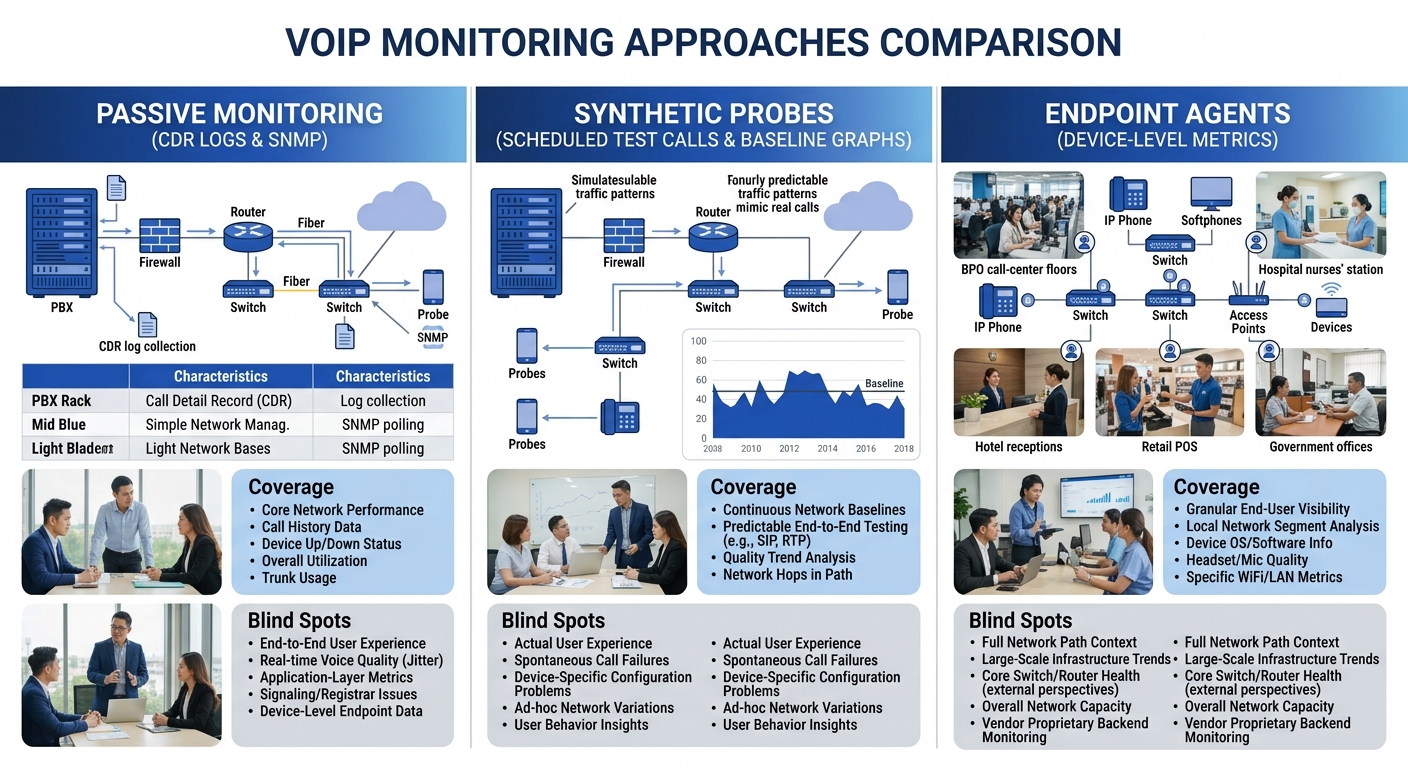
Passive monitoring collects network health metrics from devices that are already on your network: SNMP polling on switches and routers, syslog streams from your PBX, and call detail records (CDRs) logged after every session. Tools like Mitel Performance Analytics provide real-time visibility into MOS scores, jitter, and latency, with proactive alerting when thresholds are crossed, according to Obkio’s 2025 VoIP monitoring tools comparison. SolarWinds VoIP Network Quality Manager (VNQM) and the built-in dashboards on Yeastar P-Series or Cisco CUCM do similar work.
The strength of passive monitoring is coverage breadth. Every call that traverses your network generates data points: SIP INVITE messages, RTP jitter statistics, DSCP markings, and syslog timestamps. A single VoIP call touches at least four layers of your network stack, as detailed in Kital’s guide to government VoIP infrastructure. Passive tools capture all four layers simultaneously without injecting any test traffic.
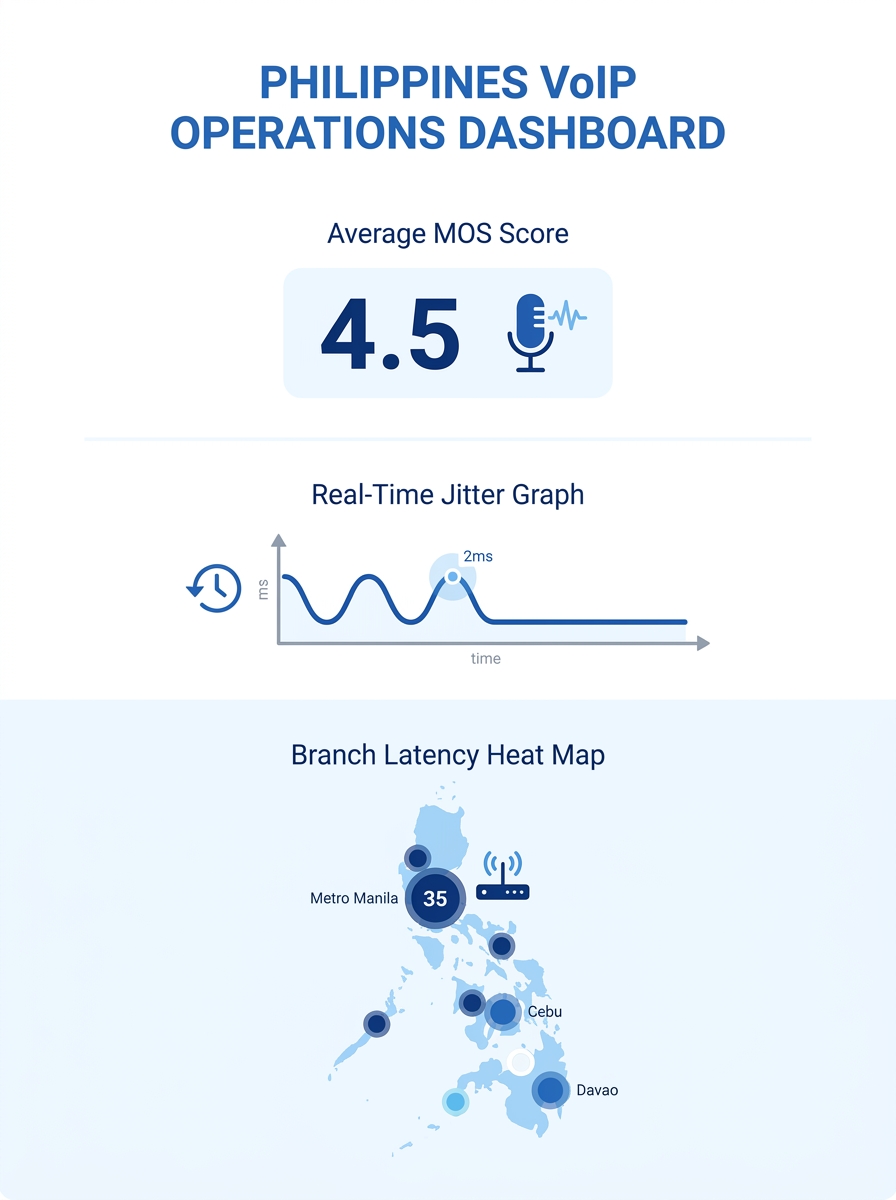
The blind spot is timing. Passive monitoring only reports on calls that have already happened. If your Makati headquarters shows 18ms average jitter and 0.2% packet loss across 500 calls today, that’s useful for trend analysis. But it tells you nothing about the degradation that will hit tomorrow at 2 PM when your BPO floor shifts overlap and bandwidth consumption spikes 40%. CDR-based analysis also masks transient problems. A call with 3 seconds of severe packet loss in the middle of an otherwise clean 8-minute conversation still logs an acceptable average MOS of 3.8 or higher, because the metric averages across the full session.
For Philippine enterprise networks running dual-ISP setups (typically PLDT and Globe or Converge), passive monitoring also struggles at the handoff point. Traffic between a Globe-connected branch and a PLDT-connected headquarters traverses interconnection points that neither provider monitors on your behalf. Your SNMP dashboard shows green on both sides while the path between them drops 4% of packets during peak hours.
Warning: If your passive monitoring tool shows MOS above 4.0 across all trunks but your helpdesk still receives “choppy audio” complaints, the problem is almost certainly in a segment your passive tools can’t see: the ISP interconnection point, the endpoint’s local network, or a transient congestion event that averages out in CDR data.
Synthetic Test Probes: Catching Problems Before Users Do
Synthetic testing flips the model. Instead of waiting for real calls to generate data, you schedule automated test calls at fixed intervals (every 5 to 15 minutes during business hours is the current recommendation) and measure their quality against known baselines. The ITU-T G.114 standard sets the ceiling at 150ms one-way latency for acceptable voice quality. Jitter should remain under 30ms, as Kentik’s network performance guide explains: “If a network experiences high latency, packets may be delayed, causing irregular arrival intervals and increasing jitter.” Packet loss tolerance sits at 1% for G.711 codec and even lower for G.729 due to its aggressive compression.
Obkio and NetBeez are the two infrastructure monitoring tools most commonly deployed for synthetic VoIP testing in multi-site Philippine networks. Both place lightweight agents at each site, generating test traffic that measures path quality independent of live call volume. The advantage for proactive call diagnostics is clear: you discover that the Cebu-to-Manila path degrades every weekday between 1 PM and 3 PM before your agents start complaining about echo and delay.
The real-world payoff shows up in edge cases that passive monitoring misses entirely. A hospital in the Philippines recorded a pristine MOS of 4.1, 12ms jitter, and zero packet loss during off-peak synthetic testing. During weekday operations, MOS dropped below 3.5 because unaccounted PACS imaging system traffic and video streaming shared the same VLAN as voice. The synthetic baseline made the gap obvious. Without it, the IT team would have blamed the VoIP provider, not the local network design.
Synthetic probes do have a cost constraint. Each probe requires a hardware or virtual appliance at every monitored site. For a Philippine enterprise with 15 branch offices across Luzon, Visayas, and Mindanao, that means 15 probe deployments, each needing maintenance and firmware updates. ECG Management Consultants’ VoIP strategy guide stresses the need to “regularly update firmware, confirm devices meet business VoIP requirements, and standardize hardware across teams to avoid inconsistent experiences.” The same discipline applies to your monitoring infrastructure.
And synthetic tests only measure the paths you configure them to test. If a new SIP trunk comes online or a failover route activates, the probes don’t automatically cover that path unless you update the test configuration. The gap between “what we test” and “what we actually use” widens over time without active management.
Endpoint Agent Monitoring: The Last Mile You Can’t See from the NOC
Why does VoIP quality monitoring stop at the LAN switch port? Because most Philippine enterprise networks treat endpoints as managed devices that connect to a managed network. The assumption breaks down the moment you introduce work-from-home agents on residential PLDT Fibr or Converge connections, softphone users on laptops connected to congested Wi-Fi, or field offices running on a single 25 Mbps DSL line shared with 30 users.
Endpoint agents (Obkio’s desktop agent, Twilio’s Voice Insights, Cisco Webex’s built-in quality metrics) run directly on the device making or receiving the call. They capture local CPU usage, Wi-Fi signal strength, audio device selection, jitter buffer performance, and packet loss at the application layer. Twilio’s Voice Insights tracks “jitter, packet loss, latency, and metrics like the length of the call,” according to their VoIP quality documentation, enabling teams to “reduce time troubleshooting call quality issues and proactively address any problems.”
For Philippine BPOs running 500+ agent seats across shifts, endpoint data transforms troubleshooting. Instead of “calls are bad on the 3rd floor,” you get “Agent workstation 3F-042 running softphone version 11.2 on Windows 11 shows 6.2% packet loss during the 2 PM to 4 PM shift, correlated with Wi-Fi channel congestion from 14 nearby access points on channel 6.” The diagnostic toolkit approach for Philippine enterprises becomes far more targeted when endpoint data narrows the search space.
The tradeoff is deployment overhead and privacy considerations. Endpoint agents require installation on every monitored device, which means MDM integration, user consent workflows (especially relevant under Philippine Data Privacy Act requirements), and ongoing agent software updates. For enterprises with 1,000+ endpoints across Metro Manila, Cebu, and Davao, the rollout itself becomes a project. And agents on personal devices for BYOD softphone users introduce policy complexity that many IT teams aren’t ready to handle.
A network with 4.0 MOS on the dashboard and 20 “choppy audio” helpdesk tickets per week has a monitoring gap, not a VoIP problem.
Side-by-Side: What Each Approach Actually Covers
The comparison matters most when you map each approach against the specific failure modes that plague Philippine enterprise networks. BladegrassTech’s Philippine infrastructure assessment guide recommends starting with a full inventory of “routers, switches, cabling, and ISP contracts” and identifying bottlenecks like “VoIP call drops” and “slow logins.” Each monitoring approach catches different bottleneck types.
| Attribute | Passive Monitoring | Synthetic Probes | Endpoint Agents |
|---|---|---|---|
| Detects problems | After calls complete (CDR/syslog) | Before users are affected (scheduled tests) | During live calls (real-time device metrics) |
| Latency visibility | Average per-call from CDRs | Per-test-interval, path-specific | Per-packet at application layer |
| Packet loss granularity | Session average (masks bursts) | Per-probe interval (5-15 min) | Per-second at the endpoint |
| ISP interconnection gaps | Cannot see past your edge router | Measures end-to-end if probes placed at both sites | Captures loss at the endpoint regardless of path |
| WFH/remote agent coverage | None (no SNMP on home routers) | Requires probe at remote site | Full coverage on any managed device |
| Deployment cost (15 sites) | Low (uses existing switch/PBX data) | Medium (15 probes at PHP 8,000-25,000/site/year) | High (agent on every device, MDM integration) |
| Maintenance burden | Low | Medium (probe firmware, test config updates) | High (agent updates, privacy compliance) |
| Best Philippine use case | NOC dashboards, SLA verification, trend reporting | Multi-ISP path validation, pre-shift baseline checks | BPO agent troubleshooting, WFH quality assurance |
The table reveals why one approach alone leaves gaps. Passive monitoring can’t see home networks. Synthetic probes can’t catch device-specific issues. Endpoint agents can’t tell you about path problems on segments where no agent exists. If your organization has reviewed how hidden network bottlenecks affect VoIP quality, you’ve already seen how a single monitoring method misses problems that live between network layers.
How to Choose Between These Three
The answer depends on your network’s shape, your team’s capacity, and where your current complaints originate.
If you’re a single-site office with 50 to 200 phones on a managed LAN, passive monitoring handles 80% of your diagnostic needs. Your PBX (Yeastar, Cisco, or Asterisk-based) already generates CDRs and RTP quality data. Add a UC analytics dashboard that tracks MOS, jitter, and packet loss trends per trunk group, and you’ll catch most degradation patterns within a week of data collection.
If you operate multiple sites connected over public internet or MPLS with dual-ISP failover, synthetic probes become essential. The interconnection blind spot between PLDT and Globe paths is real, and passive monitoring on your LAN switches won’t reveal it. Budget PHP 120,000 to PHP 375,000 annually for 15-site probe coverage. Switches and routers typically last 5 to 7 years, but refresh cycles should be tied to performance metrics rather than calendar dates.
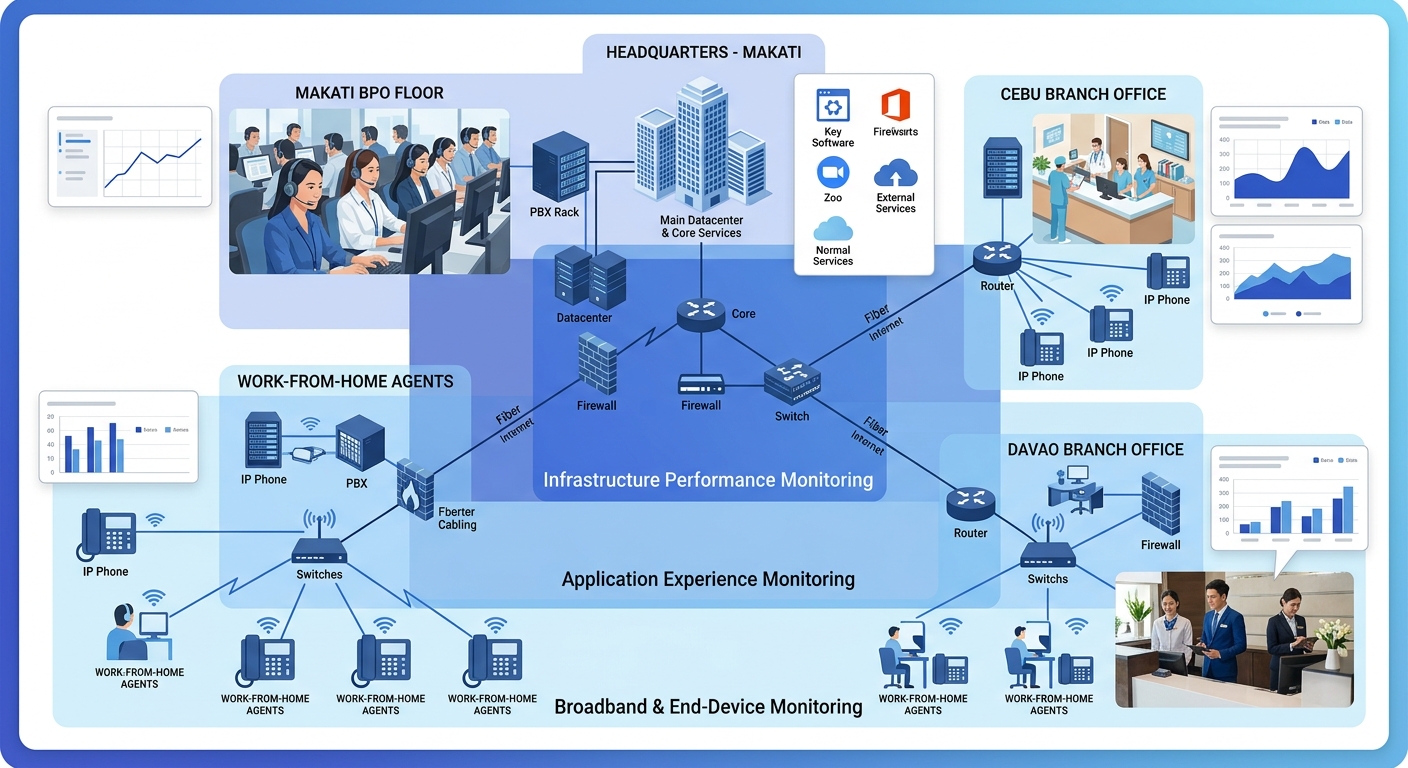
If you run a BPO with hundreds of agents, support work-from-home staff, or use softphones on laptops, endpoint agents are the layer you can’t skip. The correlation between device-level data and user feedback converted into diagnostic intelligence is what turns vague “bad call” tickets into actionable fixes. Twenty tickets reporting “choppy audio” on outbound mobile calls between 1 PM and 4 PM from the third floor of a Makati office might reveal a localized Wi-Fi congestion pattern that no passive tool or synthetic probe would catch.
For most Philippine enterprises with 3 or more sites and any remote workforce, the practical minimum is passive monitoring plus synthetic probes, with endpoint agents deployed selectively on high-value seats (supervisors, sales teams, executive lines) before a full rollout. The monitoring stack should grow as your user complaint data tells you where the remaining blind spots live. The organizations that maintain clean call quality across shifting ISP conditions, growing headcounts, and distributed workforces aren’t the ones with the biggest budget. They’re the ones that closed every diagnostic gap they found.