
DSCP 46 (Expedited Forwarding) marking combined with Low Latency Queuing at the WAN edge is what separates a Philippine enterprise VoIP deployment that sounds clear under load from one that crackles and drops calls every afternoon at 2 PM. Without both configured end-to-end, voice packets compete with file transfers and cloud backups as best-effort traffic.
TL;DR: Configure voice VLANs to isolate phone traffic at Layer 2, mark voice packets with DSCP 46 at the access layer, enforce trust boundaries on every switch between PBX and WAN uplink, and apply Low Latency Queuing with strict priority at the router’s WAN interface. Skip any one step and QoS falls apart under congestion.
The Bandwidth Math That Determines Your QoS Budget
Why does VoIP QoS configuration start with arithmetic rather than router commands? Because your bandwidth reservation must match your peak concurrent call count, and getting this number wrong means the queuing policy either wastes capacity or starves voice during spikes.
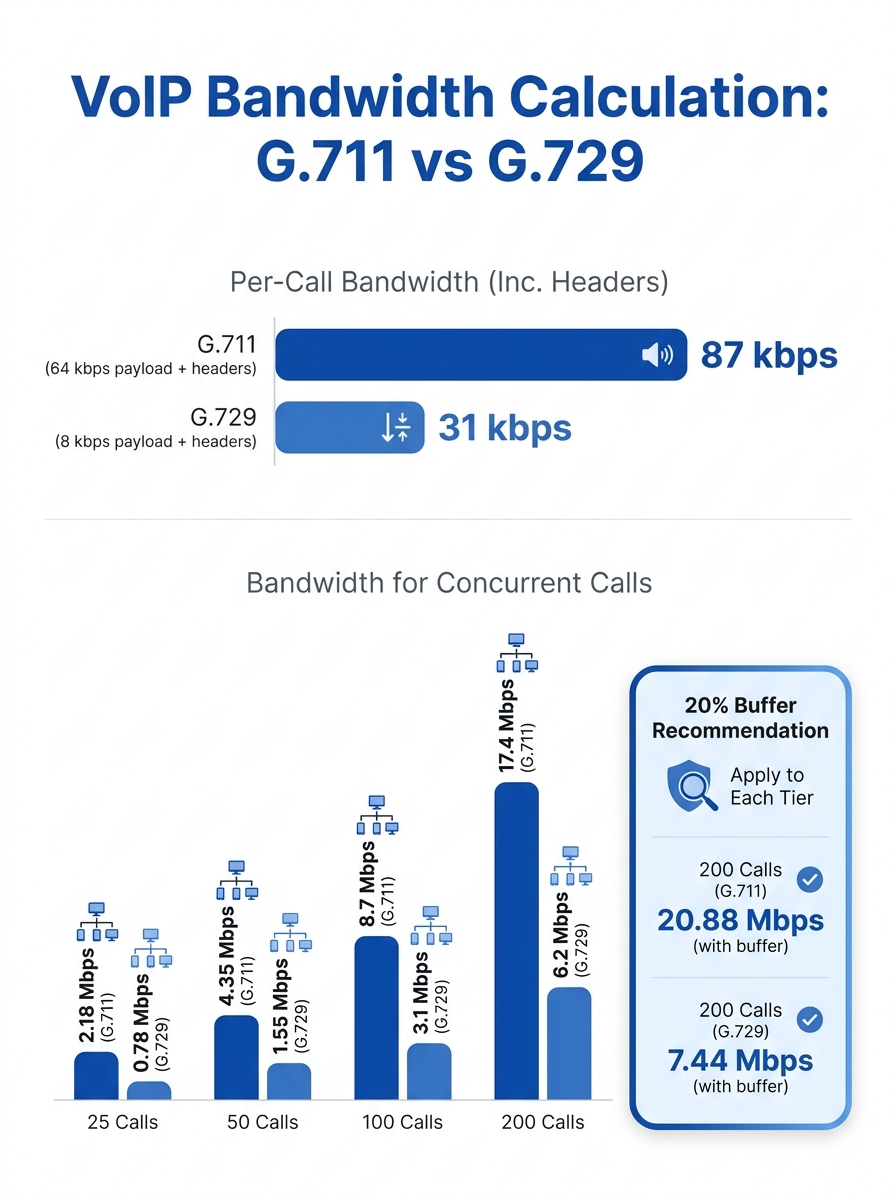
A single G.711 call consumes approximately 87 kbps of bandwidth when you account for IP, UDP, and RTP headers on top of the 64 kbps codec payload. G.729 calls are lighter at roughly 32 kbps each. Your network needs to provide at least 64 kbps per call as a bare minimum, but real-world overhead pushes that higher. For a 50-seat operation running G.729, you’re looking at 1.6 Mbps of voice traffic at full load. Add a 20% buffer for call setup overhead and silence suppression inaccuracies, and you need to reserve roughly 1.92 Mbps of strict-priority bandwidth on your WAN uplink.
This math matters because Philippine enterprise internet connections often sit at 50 to 100 Mbps symmetric for mid-sized offices, and BPO call centers with 200+ concurrent agents can saturate a 100 Mbps link during shift overlap periods. The QoS policy you build must reserve the right slice of that pipe and protect it absolutely.
VLAN Separation Creates the Trust Foundation
Router QoS tagging and VLAN segmentation work as a pair. The VLAN isolates voice at Layer 2 so you can apply differentiated policies at Layer 3. Without a dedicated voice VLAN, your switches treat phone traffic identically to a Windows Update download hitting 200 workstations simultaneously.
Set up a dedicated voice VLAN (a common assignment is VLAN 100 or VLAN 200) on every access switch where IP phones connect. Cisco, Yeastar, and Fanvil phones all support LLDP-MED or CDP to auto-discover their voice VLAN assignment from the switch port. On a Cisco Catalyst switch, the port configuration assigns an access VLAN for the PC plugged into the phone’s passthrough port and a separate voice VLAN for the phone itself. This dual-VLAN trunk ensures voice frames carry an 802.1Q tag with a CoS (Class of Service) value of 5, which corresponds to DSCP 46 at Layer 3.
According to Cisco’s documentation on VLAN tag-based QoS, packets with specific VLAN identification numbers can be classified into distinct traffic classes. You define a class map matching your voice VLAN range, then apply that class inside a policy map with the appropriate queuing treatment. The typical next step is enabling class-based weighted fair queuing (CBWFQ) with a strict priority queue for the voice class.
If your organization runs multiple sites connected by SD-WAN or MPLS circuits, the VLAN design must be consistent across locations. We’ve covered the performance tradeoffs of SD-WAN versus MPLS for multi-site VoIP separately, but the QoS tagging principles remain identical regardless of underlay.
Trust Boundaries: Where DSCP Tags Get Stripped
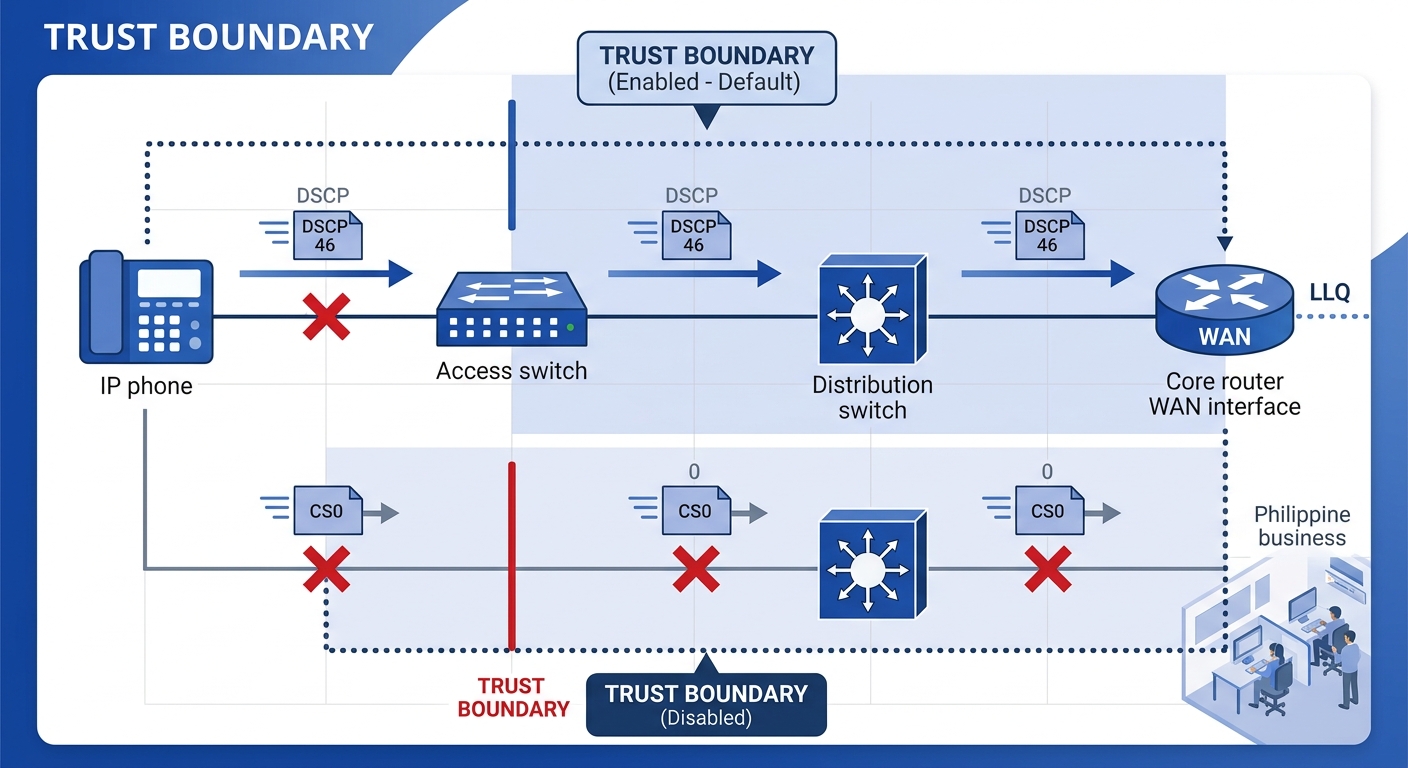
The single most common reason VoIP QoS configuration fails in Philippine enterprise networks is that switches between the access layer and the WAN edge don’t trust incoming DSCP markings. A phone marks its RTP packets as DSCP 46 (EF), but a switch with QoS trust disabled resets those packets to DSCP 0 (best effort). By the time they reach the router, every packet looks identical.
You need to configure Layer 2 trust explicitly on every switch port connected to an IP phone. On Cisco switches, this means setting the port to trust DSCP or trust CoS. On Fortinet switches or other managed switches common in Philippine SME deployments, the configuration varies but the principle is the same: the switch must preserve the DSCP value as traffic traverses each hop.
The trust boundary defines where in your network you allow endpoints to set their own priority. For IP phones from known manufacturers (Fanvil, Yeastar, Cisco, Poly), trusting DSCP at the access port is safe because the phone firmware sets the correct marking. For softphones running on PCs, you should set the trust boundary at the switch or router instead, because a compromised or misconfigured PC could mark all its traffic as EF and crowd out legitimate voice calls.
Warning: If you trust DSCP on ports where PCs connect directly (without a phone inline), any application on that PC can self-prioritize. Apply QoS trust only on dedicated voice VLAN ports, or use policy maps that re-mark traffic based on source subnet and UDP port range (typically 16384–32767 for RTP).
Low Latency Queuing at the WAN Edge
Low Latency Queuing (LLQ) is the mechanism that gives voice packets a strict-priority exit from the router, and it is the single configuration that makes the biggest difference to call quality under network load. Without LLQ, even correctly marked DSCP 46 packets sit in the same output queue as everything else during congestion.
On a Cisco IOS router, LLQ is configured inside a policy map using the priority command with a bandwidth value. That value should match your peak concurrent call calculation from the bandwidth math section above. For 50 G.729 calls, you’d set approximately 1.92 Mbps as the strict priority allocation. The router then services this queue first, with absolute precedence over all other traffic classes.
The Cisco QoS handbook from LiveAction specifies that the committed burst (BC) and excess burst (BE) should be configured to ensure optimal performance for real-time traffic. BC should be set to a value less than or equal to 1/100 of the target shaped rate (CIR). For a 100 Mbps WAN circuit, that puts BC at 1 Mbps or below. Getting BC wrong leads to burstiness in the shaper that manifests as periodic jitter spikes visible in RTP stream analysis.
Beyond the priority queue for voice, you’ll want at least two other classes in your policy map: one for call signaling (SIP and SRTP control traffic, marked DSCP 24/CS3) allocated around 5% of bandwidth, and a default class for everything else. The AVOXI 2026 guide to VoIP QoS recommends applying QoS settings to all relevant network interfaces, including IP phones, routers, switches, and gateways, then performing test calls to verify that voice prioritization and DSCP tag honoring work across every segment.
The trust boundary and the LLQ policy are two halves of the same mechanism. One preserves the DSCP marking; the other acts on it. Configure one without the other and you’ve done nothing.
A Three-Class Policy Map for Philippine Bandwidth Constraints
Philippine enterprise networks face a specific challenge that North American QoS guides overlook: asymmetric bandwidth. Many business connections from Globe, PLDT, or Converge deliver higher download speeds than upload, and VoIP call quality degrades on the upload side first because outbound voice packets compete with outbound data. Your QoS policy must be applied on the WAN interface’s outbound (egress) direction.
A practical three-class policy map for a Philippine enterprise with 100 Mbps symmetric or 100/50 Mbps asymmetric bandwidth:
| Traffic Class | DSCP Marking | Bandwidth Allocation | Queuing Method |
|---|---|---|---|
| Voice (RTP) | DSCP 46 (EF) | 10–15% of WAN upload (strict priority) | LLQ priority queue |
| Call Signaling (SIP) | DSCP 24 (CS3) | 5% of WAN upload (guaranteed minimum) | CBWFQ bandwidth guarantee |
| Default (all other) | DSCP 0 (BE) | Remaining bandwidth (fair queuing) | CBWFQ fair-queue |
For organizations in the financial institution telecom sector or healthcare verticals where encrypted voice is mandatory, add SRTP overhead of approximately 10% to your voice bandwidth reservation. G.711 with SRTP pushes per-call bandwidth to roughly 96 kbps.
Consider a concrete scenario: your enterprise runs on asymmetric bandwidth where the upload is 50 Mbps and you have 100 concurrent G.711 calls. Voice alone needs 9.6 Mbps on the upload path, which is nearly 20% of your upload capacity. That leaves meaningful pressure on the remaining 80% for email, CRM uploads, and cloud sync traffic. Philippine network bandwidth optimization in these scenarios often means upgrading the circuit or switching codecs from G.711 to G.729 to cut voice bandwidth consumption by 63%.
Wireless QoS for Softphones and Mobile UC
Enterprise VoIP performance tuning doesn’t end at the wired infrastructure. Softphones running on laptops and mobile UC clients connecting over Wi-Fi need wireless QoS configured separately, because wired QoS policies do not extend to wireless clients automatically.
Wi-Fi Multimedia (WMM) is the wireless equivalent of wired QoS, and it maps DSCP values to four access categories: Voice, Video, Best Effort, and Background. DSCP 46 maps to the WMM Voice access category, giving those packets priority access to the wireless medium. On access points from Cisco, Fortinet (FortiAP), or Ruckus, WMM is typically enabled by default, but the DSCP-to-WMM mapping must be verified in the controller configuration.
Restrict voice-capable SSIDs to the 5 GHz band (or 6 GHz on Wi-Fi 6E access points). The 2.4 GHz band in any Philippine office building is congested with Bluetooth devices, neighboring networks, and microwave interference from the pantry. Running VoIP on 2.4 GHz introduces latency spikes of 50 to 200 ms that no amount of wired QoS can fix. The acceptable thresholds for call quality remain well-established: one-way latency below 150 ms, jitter below 30 ms, and packet loss below 1%. Problems like dropped calls, choppy voices, and echoes trace back to network performance that breaches these thresholds, and wireless links are where breaches happen first.
Verification Under Simulated Load
A QoS configuration that looks correct in the CLI is meaningless until verified under realistic traffic conditions. The verification process requires generating traffic that simulates peak concurrent calls while monitoring latency, jitter, and packet loss at the WAN egress point.
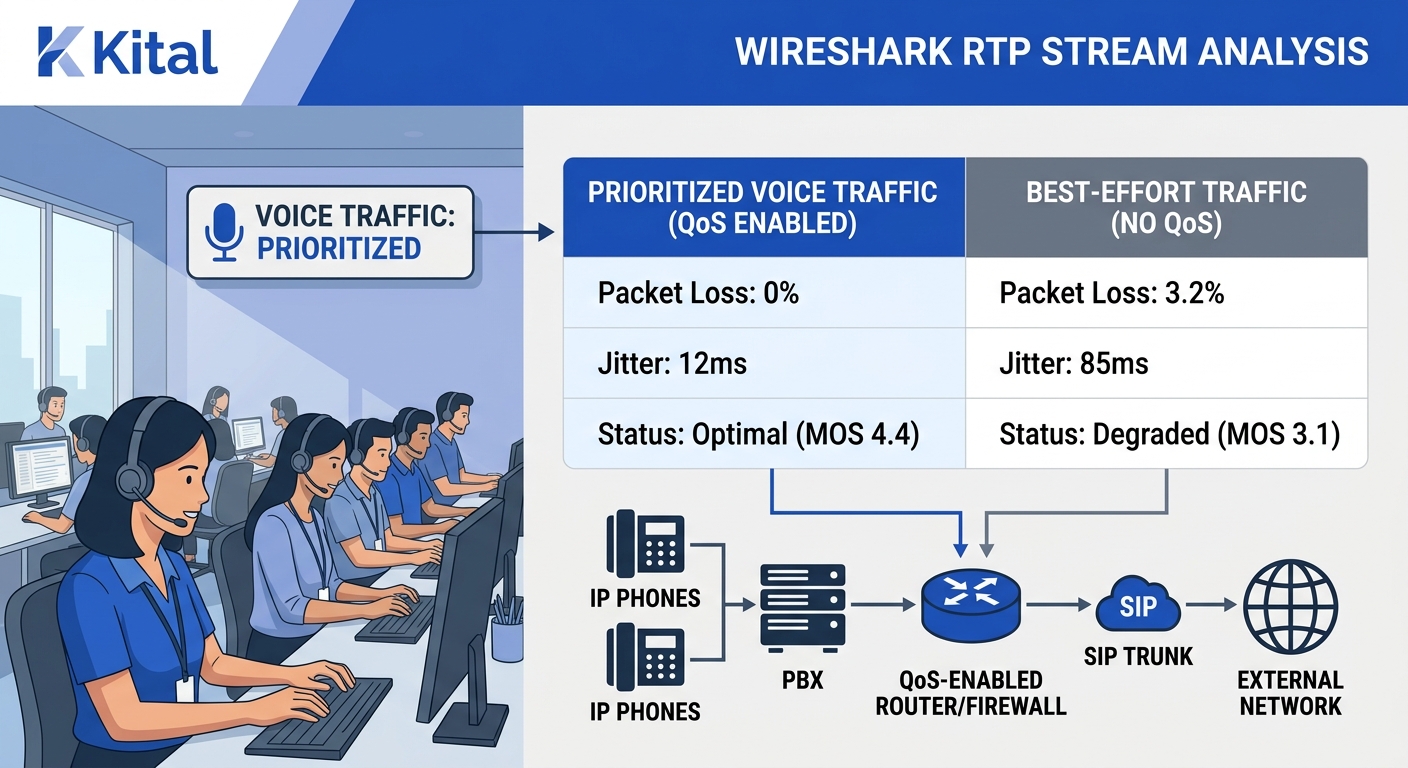
Use a traffic generator (iPerf3 works for saturating the link; SIPp or VoIP Spear for realistic SIP/RTP load) to push the WAN interface past 80% utilization. While the link is loaded, place test calls and capture the RTP streams using Wireshark on a mirrored port. We’ve published a detailed walkthrough for using Wireshark for VoIP call diagnostics that covers the Telephony > RTP Streams analysis workflow.
What you’re looking for during verification:
- Voice packets maintain DSCP 46 marking at the router’s WAN egress (check with a packet capture on the outside interface)
- Jitter on voice RTP streams stays below 30 ms even at 90% link utilization
- Packet loss on voice streams stays at 0% while best-effort traffic experiences drops, which proves the priority queue is working
- MOS (Mean Opinion Score) for test calls remains above 4.0
If voice packets arrive at the router marked DSCP 0 instead of 46, the trust boundary is broken somewhere between the phone and the router. Trace backward switch by switch. If DSCP 46 is preserved but jitter spikes under load, the LLQ bandwidth allocation is too small for your concurrent call count. Increase the priority queue bandwidth and retest. For organizations dealing with deeper call quality issues beyond the QoS layer, the guide on root-cause analysis for VoIP degradation covers SNMP-based monitoring, syslog correlation, and per-stream RTP analysis. And when physical layer faults are the real culprit, a properly engineered structured cabling infrastructure prevents the intermittent packet loss that no QoS policy can compensate for.
What Still Isn’t Settled
QoS gives you control inside your own network perimeter. The moment voice packets leave your WAN interface and enter your ISP’s network, your DSCP markings are typically stripped. Globe, PLDT, and Converge do not honor customer DSCP tags on standard business internet circuits. Only dedicated SIP trunking services or MPLS VPN circuits from these carriers preserve QoS markings end-to-end.
This creates a gap for Philippine enterprises using internet-based SIP trunking. Your internal QoS policy protects voice from your own data traffic, but it cannot protect voice from congestion on the ISP’s backbone. During typhoon-season outages or submarine cable degradation events, call quality drops regardless of how well your internal QoS is configured. That gap is where business continuity planning for telecom resilience and dual-ISP failover architectures enter the picture.
The other open area is QoS for remote workers. Philippine enterprises increasingly have staff connecting from home over residential Globe or PLDT fiber, where the home router has no QoS configuration and the household shares bandwidth with streaming, online gaming, and video calls from other family members. Some UC platforms (Microsoft Teams, Zoom Phone) attempt client-side packet marking, but whether the home router and ISP honor those marks is unpredictable. SD-WAN solutions with client-side agents offer a partial answer by establishing encrypted tunnels that carry priority markings from the endpoint, but adoption remains low among Philippine SMEs. The hybrid workforce QoS problem is real, and no router configuration sitting in your server room at the office solves it on its own.