
Fortinet’s FortiGate firewalls ship with SIP Application Layer Gateway enabled by default, and that single setting causes more one-way audio and dropped-call complaints in Philippine enterprise VoIP deployments than misconfigured codecs or saturated WAN links combined.
The 30-Second Death Pattern
When a VoIP call connects, both parties hear each other clearly, and then audio cuts out at exactly 30 seconds, the firewall is almost always responsible. SIPSymposium’s analysis of enterprise call failures documents this exact signature: enterprise firewalls typically enforce UDP session timeouts between 60 and 300 seconds, but the failure follows a consistent pattern where audio stops precisely 30 seconds after the last RTP packet exchange.
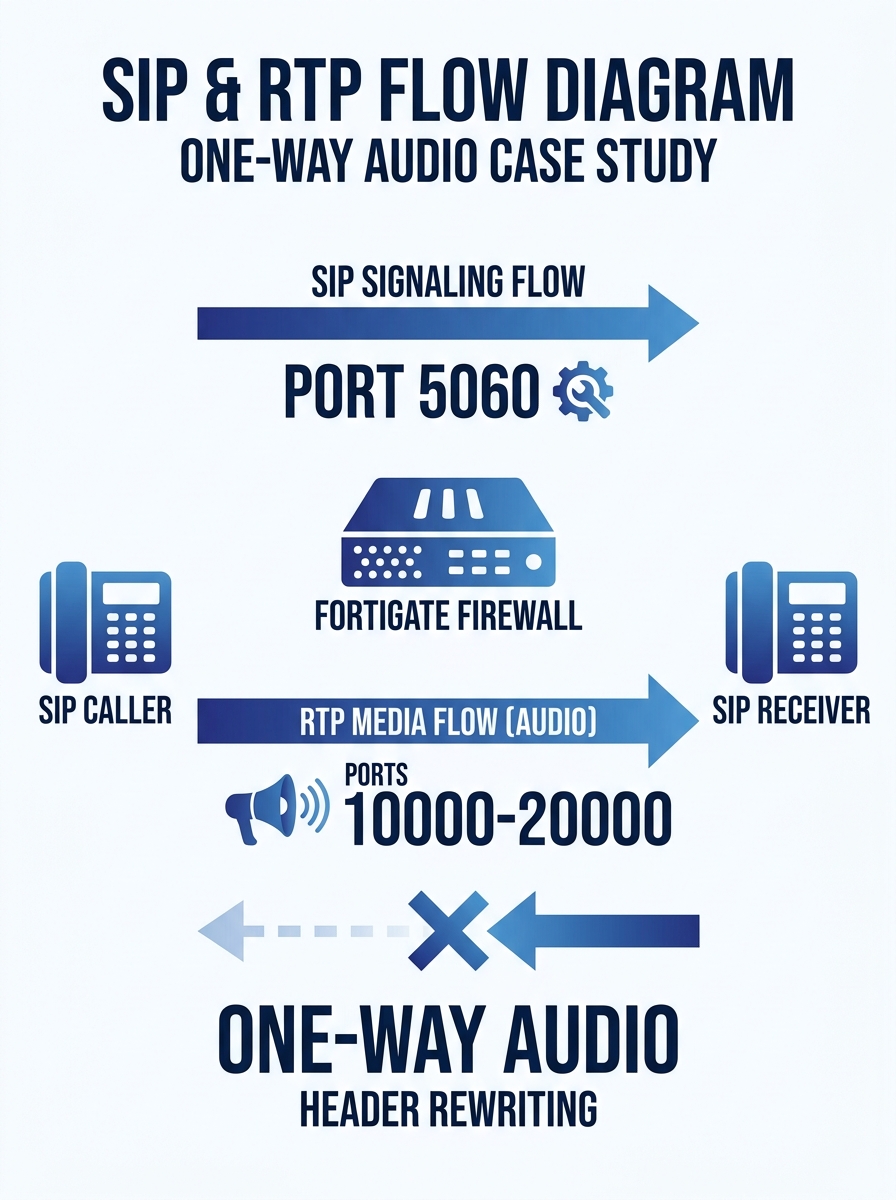
The mechanism behind this is straightforward. SIP signaling on port 5060 (or port 5061 for TLS) negotiates the call setup. Once the call is established, actual voice data flows as RTP packets over UDP, typically on ports in the 10000 to 20000 range. These are two separate streams. A firewall that handles SIP signaling correctly can still block or lose track of the RTP media stream, which carries the actual audio.
In Philippine offices running FortiGate 60F or 100F models, common across BPO satellite offices, provincial bank branches, and government field units, the default SIP ALG configuration intercepts both streams and rewrites the SIP headers. That rewriting is where firewall VoIP blocking originates, and where everything breaks for the end user.
How FortiGate’s SIP ALG Rewrites Headers Behind Your Back
SIP ALG was designed to solve a legitimate problem. When a phone on a private LAN at 192.168.1.100 sends a SIP INVITE to a public server, the SDP body of that INVITE contains the phone’s private IP as the destination for return audio. The public server can’t route RTP packets back to a private address. SIP ALG was supposed to rewrite that address to the firewall’s public IP automatically.
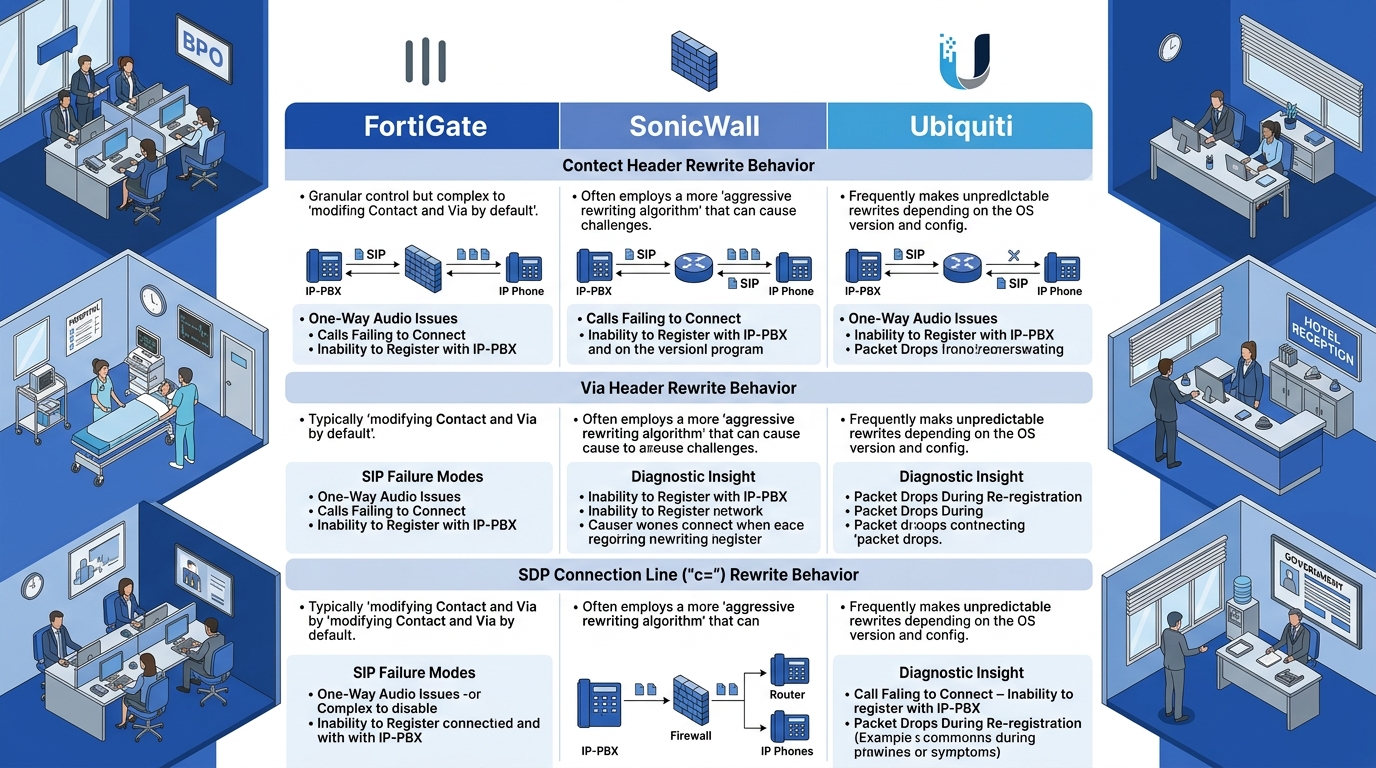
The reality is that SIP ALG implementations across FortiGate, SonicWall, and Ubiquiti introduce more problems than they solve. One practitioner on the r/VOIP subreddit captured the consensus bluntly: “TCP signaling sounds great till you turn it on and realize how broken various vendors’ firewalls and SIP stacks are since they are designed around expecting UDP for SIP.”
The specific damage on FortiGate devices is well documented. The Network Information Library at the University of Žilina published a detailed walkthrough showing that FortiGate’s default VoIP profile processes both SIP and RTP traffic at the kernel level, modifying Contact headers, Via headers, and SDP connection data fields. When those modifications conflict with what the VoIP server expects (and they frequently do), the results are one-way audio, registration failures, or calls that connect but produce silence after the NAT binding expires.
For Philippine enterprises running Yeastar P-Series or S-Series PBX systems behind a FortiGate, this creates a distinctive complaint pattern. Calls between internal extensions work fine. Calls to external SIP trunks through Globe, PLDT, or third-party providers fail with one-way audio, where the remote party can hear the local caller but the local caller hears nothing. PBX logs show a successful 200 OK response, so the SIP signaling layer looks clean. The problem stays invisible until you run enterprise VoIP diagnostics with a packet capture at the firewall’s WAN interface, where you can see that return RTP packets arrive at the FortiGate but never reach the phone.
Disabling SIP ALG on FortiGate Without Breaking Existing Policies
The fix requires changes in two places: the FortiGate system settings and the VoIP profile. The NIL walkthrough specifies the exact sequence. First, back up your firewall configuration. Then in system settings, disable the SIP helper, disable SIP NAT trace, and switch the default VoIP ALG mode to kernel-helper-based. Second, edit the default VoIP profile to set both SIP and RTP processing to disabled.
After applying these changes, the FortiGate stops intercepting and rewriting SIP traffic entirely. The PBX or SIP phones handle NAT traversal VoIP themselves, using STUN servers or the hosted NAT traversal built into their SIP registrar.
Warning: Disabling SIP ALG on a production firewall affects all VoIP traffic passing through the device. Schedule this during a maintenance window and confirm with your SIP trunk provider first, since rare legacy providers depend on ALG-assisted traversal.
The SIP ALG configuration path varies across firewall vendors. The Viirtue guide on SIP ALG problems notes that for Ubiquiti UniFi devices, the toggle lives under Settings, then Routing, then NAT, then Firewall Connection Tracking, where you set SIP to off. Cisco Meraki handles things differently; its documentation states that the UDP timeout timer “cannot currently be changed” and that “a timeout would require both peers to be completely silent for an extended period of time in order to take effect.”
That Meraki limitation matters for Philippine deployments where branch offices use MX appliances. If you can’t adjust the UDP timeout, you need the PBX to send keep-alive packets frequently enough to prevent the NAT binding from expiring. For Yeastar systems, this means setting the SIP re-registration interval to 60 seconds or less. For Fanvil phones, the keep-alive interval in SIP account settings should be 30 seconds.
UDP timeout troubleshooting across these scenarios follows a consistent diagnostic path. Check the firewall’s session table for SIP and RTP entries. If the session timeout is below 120 seconds and your PBX keep-alive interval exceeds that value, the NAT binding expires between keep-alives. The firewall drops the binding, subsequent inbound RTP packets have no matching session entry, and audio dies. We cover the router-model-specific behavior in detail in our piece on UDP timeout and NAT binding across common Philippine routers.
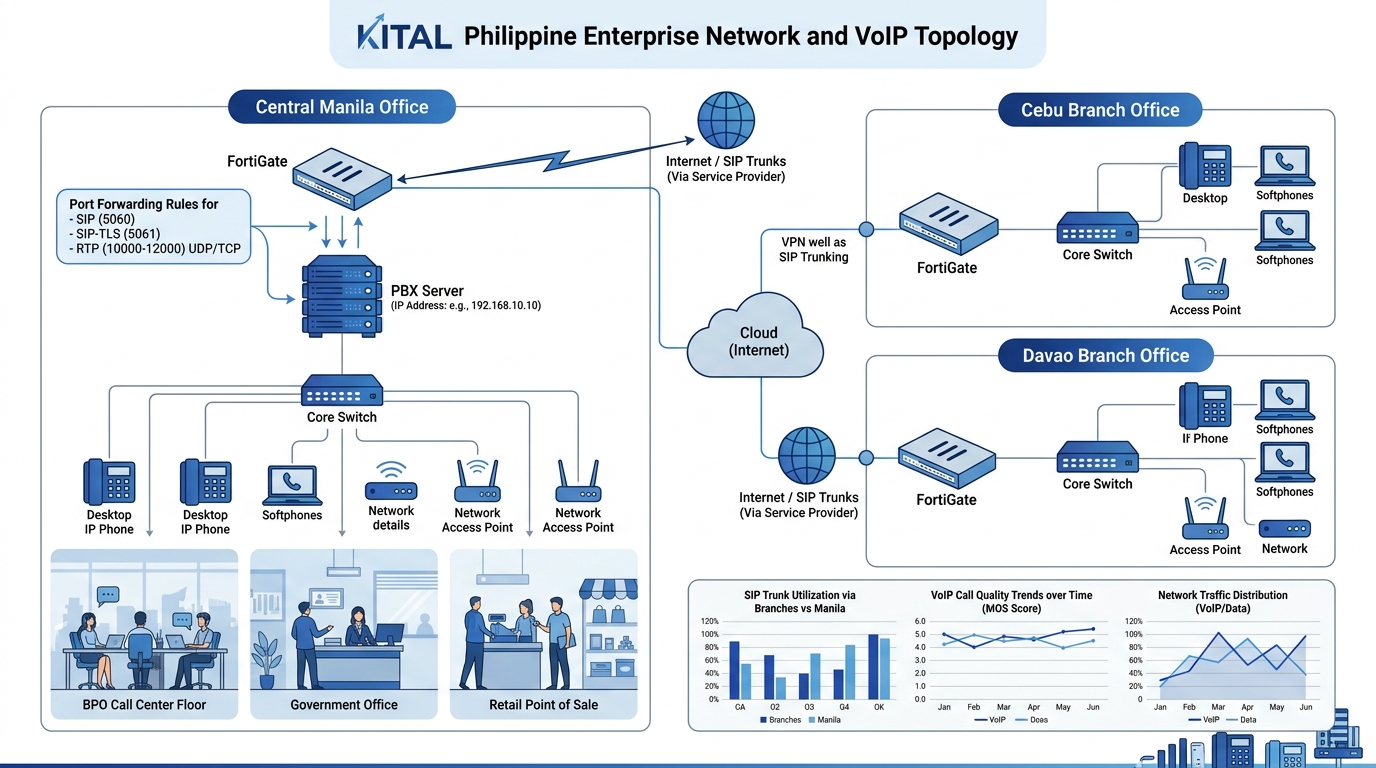
Once SIP ALG is off, firewall VoIP blocking becomes a standard port-access problem. You need the firewall to permit inbound traffic on port 5060 for SIP, port 5061 for SIP-TLS, and the RTP port range your PBX uses. Yeastar defaults to ports 10000 through 12000. Asterisk-based systems commonly use 10000 through 20000. Cisco Unified CM uses 16384 through 32767, a wider range that makes keeping firmware patched especially important from a security standpoint.
The real diagnostic skill in NAT traversal VoIP troubleshooting is reading the SDP body inside SIP messages, because that’s where the actual media destination address lives, and where the mismatch between private and public addresses becomes visible.
For organizations evaluating broader unified communications platforms that bundle voice, video, and messaging, the firewall surface grows further. Video conferencing typically adds port 3478 for STUN/TURN and a media range from 40000 through 49999, each requiring its own forwarding rule.
Why This Pattern Keeps Repeating Across Philippine Branch Networks
The SIP ALG failure documented by the University of Žilina and in the Viirtue and SIPSymposium guides describes the same mechanism that Philippine IT teams encounter repeatedly, driven by three converging factors specific to this market.
First, FortiGate is the dominant SMB and mid-market firewall in the Philippines. Fortinet’s deep channel presence through local distributors means a 60F or 100F appliance sits at the WAN edge of thousands of offices from Makati to General Santos. Every single one ships with SIP ALG on.
Second, Philippine ISPs assign dynamic public IPs to most business-grade fiber plans. Dynamic IPs compound NAT traversal challenges because the public-facing address in SIP registrations changes whenever the ISP reassigns it, typically every 24 to 72 hours. If the PBX doesn’t re-register after an IP change and the firewall’s ALG has cached the old address in rewritten headers, calls fail until registration refreshes. This is a related trigger behind the phantom offline deregistration cycles that plague branch deployments.
Third, Philippine VoIP deployments overwhelmingly use on-premises PBX hardware (Yeastar, Grandstream, or Asterisk-based systems) behind the firewall rather than cloud-hosted platforms. On-prem puts the NAT traversal burden entirely on the local network team. Cloud services handle this server-side using hosted NAT traversal, where the server relays media through a public-facing proxy. On-prem deployments don’t have that fallback.
The fix sequence is always the same: disable SIP ALG, configure port forwarding for SIP and RTP, set keep-alive timers below the firewall’s UDP session timeout, and verify with a packet capture that RTP flows in both directions. Building an automated check for SIP ALG status and UDP session timeouts into your call quality regression testing framework prevents silent regressions after firmware updates, which have been known to reactivate the SIP helper. A quarterly audit of three settings (SIP helper status, VoIP profile processing flags, and UDP session timeout value) takes less than 10 minutes per FortiGate and eliminates the single most common cause of enterprise VoIP call failures in Philippine networks.