
Philippine offices running 10 to 200 analog desk phones face three realistic paths for connecting those handsets to a modern VoIP system: single-port analog telephone adapters, multi-port FXO gateways, or outright replacement with SIP phones. Each carries different costs, caller ID behavior, and migration complexity.
TL;DR: Single-port ATAs like the Grandstream HT801 cost $30–60 and work well for small branches. Multi-port gateways suit enterprises doing incremental VoIP migration across dozens of lines. Full IP phone replacement costs more upfront but removes the legacy phone integration ceiling permanently.
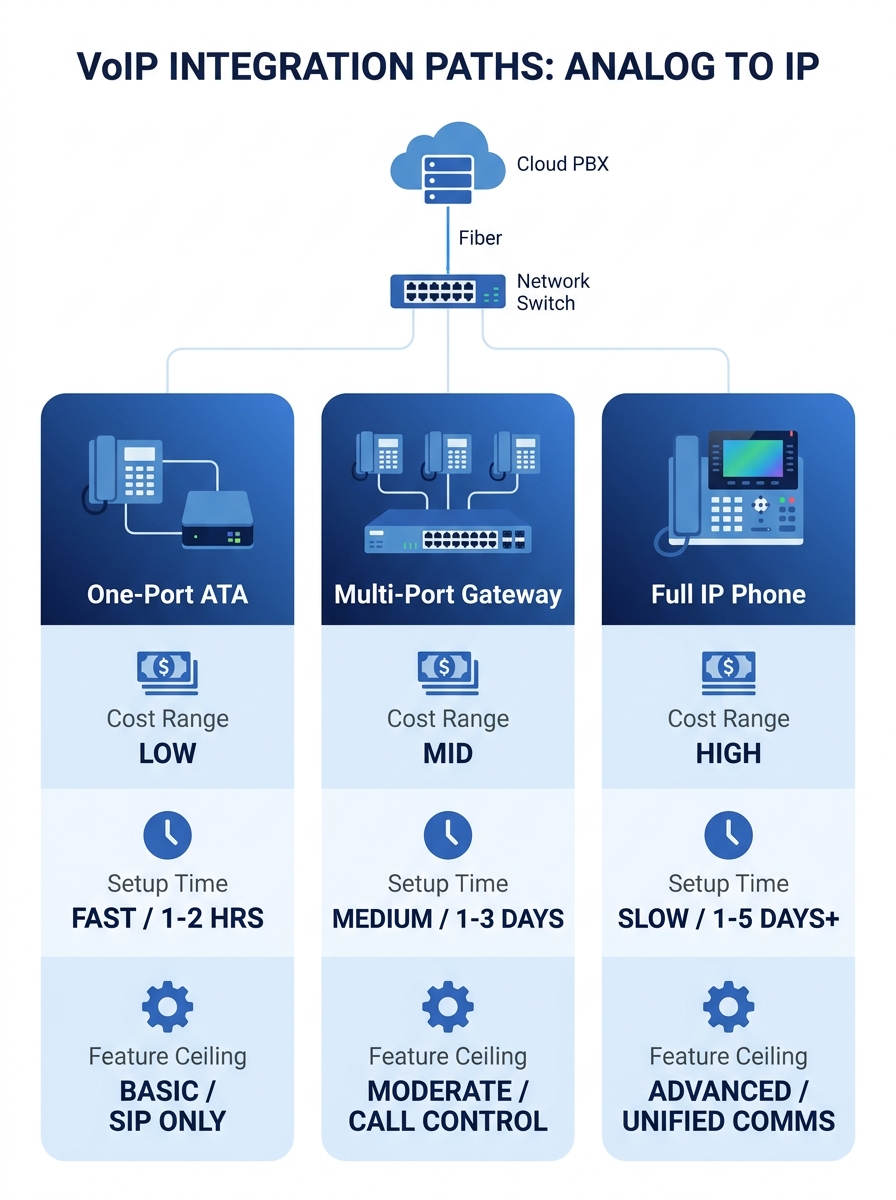
| Feature | Single-Port ATA | Multi-Port Gateway | Full IP Replacement |
|---|---|---|---|
| Cost per seat | $30–60 | $10–25 per port | $50–150 per phone |
| Caller ID control | Set via provider portal | Configurable per trunk | Full per-extension control |
| Setup time per device | 10–20 minutes | 30–60 minutes (batch) | 15–45 minutes |
| Feature ceiling | Hold, transfer, caller ID | Hold, transfer, fax, IVR passthrough | Full UC: presence, BLF, video |
| Best fit | Small offices, guard desks | Phased enterprise rollouts | Greenfield or full cutover |
Single-Port ATAs for Small Offices and Guard Desks
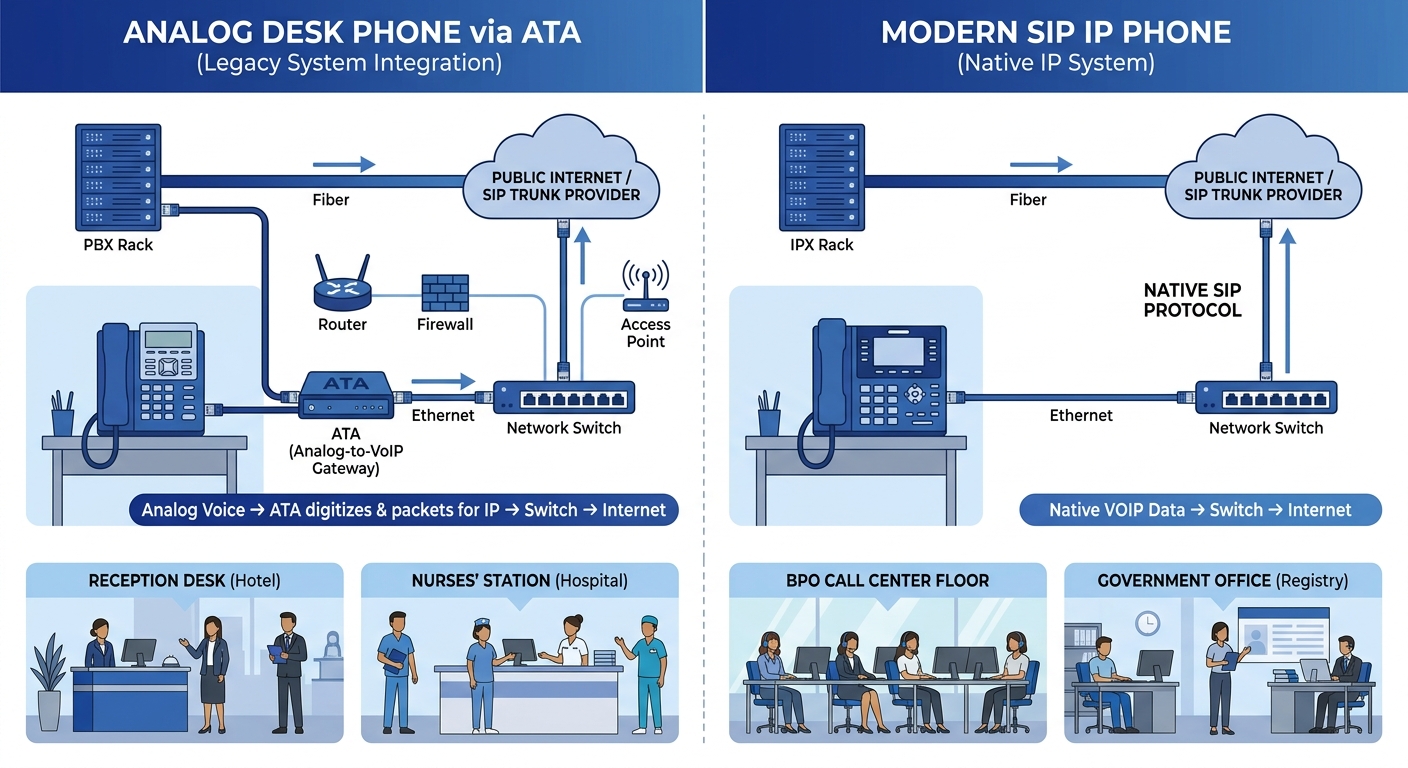
A single-port analog telephone adapter connects one analog phone to your SIP-based VoIP system. The device plugs into your LAN via an RJ-45 Ethernet port on one side and accepts an RJ-11 phone cable on the other. Grandstream describes their HT series adapters as supporting up to 3 SIP profiles through a single FXS port, which means one analog handset can register to multiple SIP accounts if needed.
ATA configuration for these devices follows a consistent pattern. You power the unit, connect it to your router, find its IP address (usually via DHCP), and open a browser-based admin panel. From there, you enter your SIP server address, the extension number, and the SIP password. VitalPBX’s 2026 migration guide confirms that “older analog phones can be connected using an Analog Telephone Adapter,” and the process really is that simple for single-port units. The whole ATA configuration process takes 10–20 minutes per device, assuming your PBX is already provisioned.
The caller ID validation story is straightforward here. With a single-port ATA, caller ID is typically set at the provider or PBX level, not on the adapter itself. VoIP.ms documents this clearly: for devices like analog telephone adapters, “the Caller ID number is available to be set from your VoIP.ms account via the customer portal.” Your analog phone displays whatever caller ID your trunk or PBX sends. If your PBX assigns extension 201 a specific outbound caller ID, the ATA passes that through without modification. The phone itself has no say in the matter.
Where does this approach fall short? The feature ceiling is low. You get basic call hold, transfer, three-way calling, and caller ID display (if your analog phone supports it). Visual voicemail, BLF keys, presence indicators, and CRM integration are off the table. For a provincial branch office running 2–3 phones, a hospital nurses’ station, or a building guard desk, that ceiling is fine. You’ll spend $30–60 per unit, and the phone your staff already knows how to use stays in service.
Tip: If you’re running an Asterisk-based PBX, mount the ATA in the same network closet as the server. This reduces latency between the adapter and the PBX, and makes [SIP trunk failover configuration](/blog/sip-trunk-failover-asterisk-pbx) simpler to manage.
When you’re evaluating codec options for bandwidth-constrained links, remember that each active call through an ATA consumes 64–100 Kbps depending on codec. A provincial branch on a 5 Mbps PLDT line can handle roughly 50 concurrent calls at G.729 rates, well above what 2–3 analog phones will ever need.
Multi-Port Gateways for Phased Enterprise Rollouts
Why would a company with 40 or 80 analog lines buy individual single-port ATAs? They shouldn’t. Multi-port FXO/FXS gateways like the Grandstream GXW4248 (48 FXS ports) or AudioCodes MediaPack series handle dozens of lines from a single rack-mounted chassis. The per-port cost drops to $10–25, and management happens from one admin panel instead of 40 separate browser sessions.
This is the path most Philippine enterprises take for incremental VoIP migration. A BPO in Cebu or a regional hospital in Davao doesn’t rip out 80 analog phones overnight. Instead, the IT team installs a multi-port gateway, registers all existing analog extensions to the new IP PBX, and migrates floor by floor over weeks or months. AudioCodes noted in their SIP Gateway blog that “beginning in early 2023, SIP Gateway will support analog telephones,” allowing Teams calling on compatible AudioCodes MediaPack adapters. That Microsoft Teams integration matters for Philippine enterprises already on Microsoft 365.
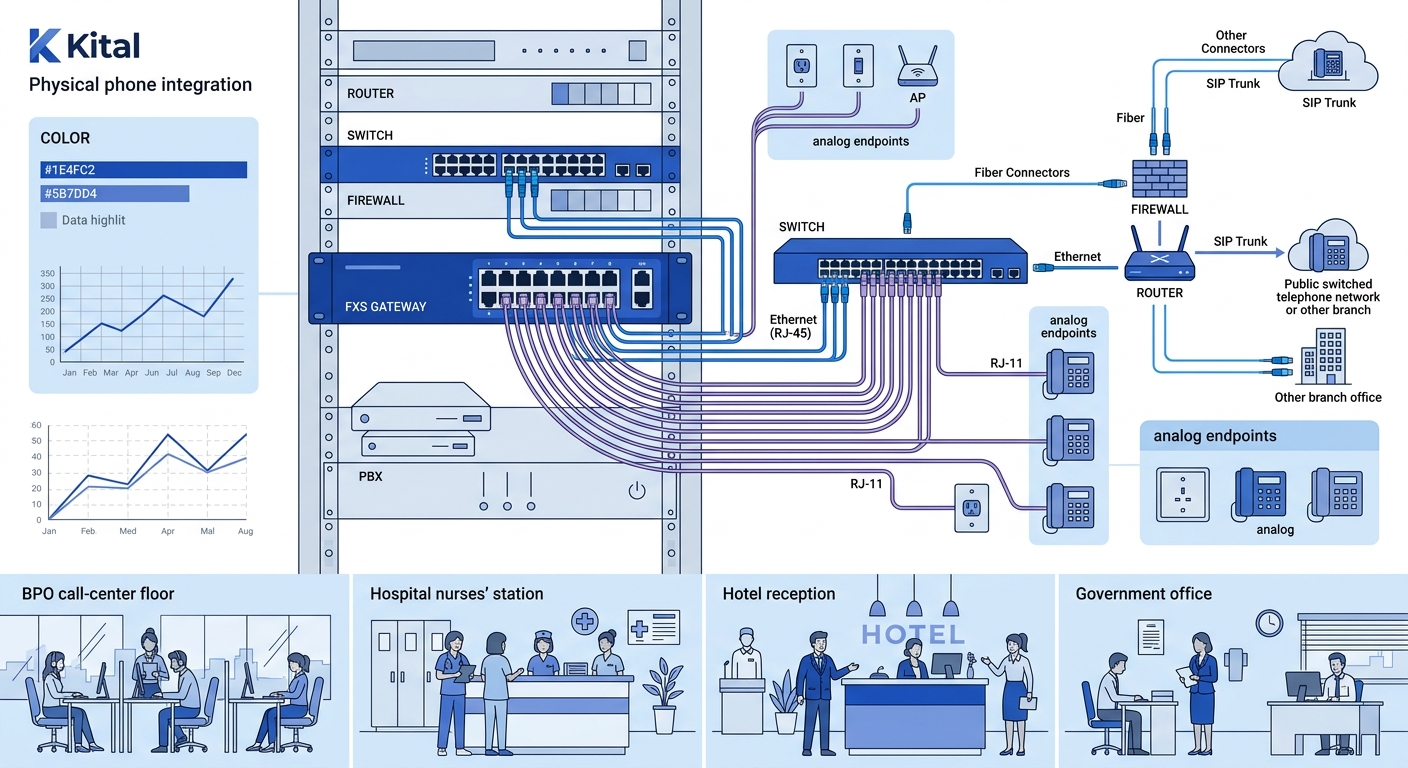
Caller ID validation becomes more interesting at this scale. With a multi-port gateway sitting between your analog phones and SIP trunk, caller ID is controlled at the trunk level. Your PBX maps each FXS port to an extension, and each extension gets its own outbound caller ID rule. For enterprises dealing with NTC-registered trunk numbers, this centralized control is essential. You can ensure every outbound call from your 02-8xxx Manila number displays the correct caller ID, regardless of which floor or department originates the call. Fairdinkum’s migration guidance highlights that “most businesses want to retain their existing phone numbers during migration, which requires coordination between carriers, providers, and internal teams.” That coordination is simpler when caller ID flows through one gateway rather than 40 independent ATAs.
The setup process for multi-port gateways takes more planning. You’ll need a port-mapping spreadsheet that matches each physical FXS port to an extension number on your PBX. Batch provisioning through the gateway’s admin panel speeds this up, but expect 30–60 minutes for initial configuration plus testing. You should also configure QoS settings on your router to prioritize traffic from the gateway’s IP address, since 48 simultaneous calls from one device can spike bandwidth needs to 4.8 Mbps at G.711 rates.
The per-port cost of a multi-port gateway drops to $10–25, and management happens from one admin panel instead of 40 separate browser sessions.
Security matters at this scale too. Modern ATAs and gateways should support TLS for SIP signaling and SRTP for media encryption. Toll fraud costs businesses over $50 billion annually worldwide, and a 48-port gateway with weak credentials is an attractive target. Before going live, run through your VoIP security hardening checklist and disable any ports you aren’t actively using.
Replacing Every Analog Phone with a SIP Endpoint
The third option skips legacy phone integration entirely. You pull the analog handsets, install IP phones or softphone clients, and eliminate the ATA layer. Per-phone costs run $50–150 for midrange SIP desk phones. Fanvil IP phones in the X-series, for example, start around $50 for basic models and scale to $150+ for phones with color displays and Bluetooth.
This approach costs more upfront but removes a permanent maintenance layer. Every ATA is a device that can fail, lose its configuration after a power outage, or fall behind on firmware updates. Multiply that by 40 or 80 units and you’ve added meaningful operational overhead. Full replacement also unlocks features that analog phones physically cannot support: BLF keys showing colleague availability, built-in PoE (eliminating power adapters), programmable speed-dial buttons, and native integration with UC platforms.
Caller ID validation is cleanest with direct SIP registration. Each IP phone registers to your PBX with its own SIP credentials, and the PBX controls outbound caller ID per extension. There’s no intermediary device translating between analog signaling and SIP. If your PBX is configured properly, what your caller sees is exactly what you set, with no ambiguity about which layer controls the display name versus the number.
The catch is change management. Philippine government agencies and hospitals, in particular, often have staff who have used the same desk phone for years. Swapping that phone introduces a training requirement. The common mistakes government agencies make during IP telephony deployment often trace back to underestimating this human factor. Budget 1–2 hours of hands-on training per department, not because IP phones are complicated, but because unfamiliarity breeds resistance.
Businesses adopting VoIP typically report 30–50% reductions in telecommunications costs over 12–24 months. But those savings assume you’ve eliminated the PSTN lines that the analog phones were originally connected to. If you replace the phones but keep paying for analog trunks “just in case,” the savings evaporate.
Warning: Don’t keep legacy PSTN trunks active after migration “for backup” unless you’ve built them into a documented [disaster recovery plan](/blog/philippine-enterprise-disaster-recovery-typhoon). Paying ₱2,000–4,000 per month per trunk for lines nobody uses is a common post-migration budget leak.
Who Should Pick Which
The decision comes down to three variables: how many analog phones you’re keeping, how long you plan to keep them, and whether your staff can absorb a hardware change.
Pick single-port ATAs if you have fewer than 10 analog phones across 1–2 locations, and those phones serve roles where advanced features don’t matter (lobby phones, guard stations, warehouse intercoms). Budget $30–60 per phone, complete your ATA configuration in an afternoon, and move on.
Pick a multi-port gateway if you’re running 20+ analog lines and want to migrate in phases. This is the standard approach for BPO operations, multi-floor offices, and hospital campuses doing incremental VoIP migration. The gateway gives you centralized caller ID validation, lower per-port cost, and the flexibility to move departments onto IP phones over weeks or months. If you’re planning a VoIP pilot program, start the pilot on IP phones while the gateway keeps your analog fleet running on the same PBX.
Pick full replacement if you’re deploying a new office, if your analog phones are already failing, or if you need UC features like presence and BLF. The upfront cost is higher per seat, but you avoid the ongoing maintenance of adapter hardware and get a cleaner architecture. For organizations comparing on-premise PBX against cloud VoIP, full replacement pairs naturally with a cloud migration since there’s no analog hardware tying you to a physical location.
Most Philippine enterprises with 50+ seats end up using a combination: gateways for the analog phones that stay in service, IP phones for new hires and executive offices, and softphone clients for remote staff. The important thing is knowing which devices need caller ID validation at the trunk level versus per-extension, and sizing your gateway ports to actual concurrent call volume rather than total phone count. A 48-port gateway serving 48 phones where only 15 are active simultaneously is wasting 33 ports of licensing you already paid for. Right-size the hardware, map the caller ID rules, and the analog phones your teams rely on will work inside your VoIP network without anyone noticing the infrastructure changed underneath them.