
DSCP value 46, a six-bit field embedded in every IP packet header, is the single most important number in VoIP call quality. It tells every router, switch, and firewall along the path that a packet carries live voice and should be forwarded first. Yet on the majority of Philippine enterprise networks we audit, that field is either unmarked or actively stripped by a misconfigured device somewhere between the PBX and the WAN uplink. The result: voice packets queue behind file transfers, cloud backups, and YouTube streams, producing the choppy, garbled calls that BPO managers in Makati and Cebu IT Park know all too well. VoIP QoS configuration exists to fix exactly this problem, and understanding the mechanism under the hood is what separates a working deployment from one that looks right on paper but sounds terrible on the phone.
How Your Router Identifies Voice Traffic
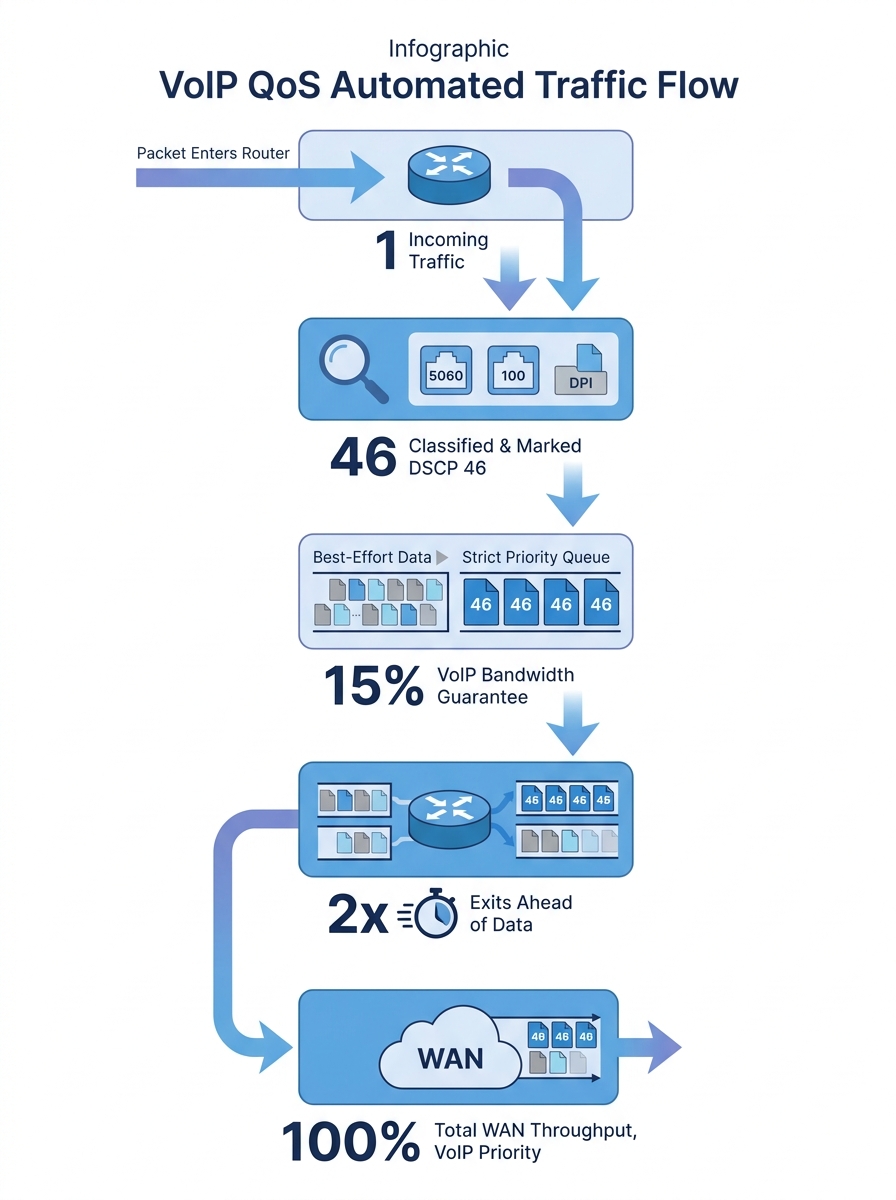
Before a router can prioritize anything, it needs to distinguish voice packets from everything else flowing through the interface. This classification step is where most VoIP network prioritization setups either succeed or silently fail.
Routers use several methods to classify traffic:
- Port-based matching. SIP typically runs on UDP port 5060, and RTP audio streams use dynamically assigned ports in a defined range (commonly UDP 10000–20000). Your access control lists can match on these port ranges to tag VoIP traffic.
- Deep packet inspection. Some firewalls, including FortiGate appliances, can inspect packet payloads to identify SIP and RTP sessions even when non-standard ports are in use.
- VLAN membership. If your IP phones sit on a dedicated voice VLAN (a common and recommended practice), you can classify all traffic from that VLAN as voice. But a voice VLAN alone doesn’t prioritize traffic. You still need queuing policies applied to the egress interfaces.
As Cisco’s documentation on QoS for Voice over IP states, to guarantee bandwidth for VoIP packets, a network device must first be able to identify VoIP packets among all the IP traffic flowing through it. Classification is the foundation layer. Skip it, and every subsequent QoS policy you configure has nothing to act on.
Why DSCP 46 Governs Call Quality
Once your router identifies a packet as voice, it marks that packet so every downstream device knows how to handle it. The standard marking for VoIP RTP traffic is DSCP 46, also called Expedited Forwarding (EF). SIP signaling packets typically receive DSCP 24 (CS3) or DSCP 26 (AF31), depending on vendor defaults.
The DSCP value lives in the Type of Service byte of the IPv4 header (or Traffic Class in IPv6). It’s a six-bit field that maps to 64 possible per-hop behaviors, but EF (46) is the universally recognized marker for real-time voice. When your Yeastar PBX, Fanvil desk phone, or Jabra headset generates an RTP stream, the originating device should already stamp each packet with DSCP 46. Your switches and routers then need to trust those markings rather than resetting them to zero.
Here’s where Philippine deployments often go wrong: a managed switch between the phone and the router has “trust DSCP” disabled by default. The switch rewrites every DSCP value to 0 (best effort), and your carefully planned router QoS setup becomes useless because the router sees all traffic as equal priority. Verifying trust settings on every Layer 2 device in the path is a critical and frequently skipped step.
If you’re troubleshooting voice quality issues and your DSCP markings look correct at the phone but disappear by the time packets reach the WAN interface, the culprit is almost always an intermediate switch with trust disabled. We’ve covered related diagnostic approaches in our guide to resolving common network issues, and the same methodical, hop-by-hop verification applies here.
Queuing Mechanisms That Protect Live Audio
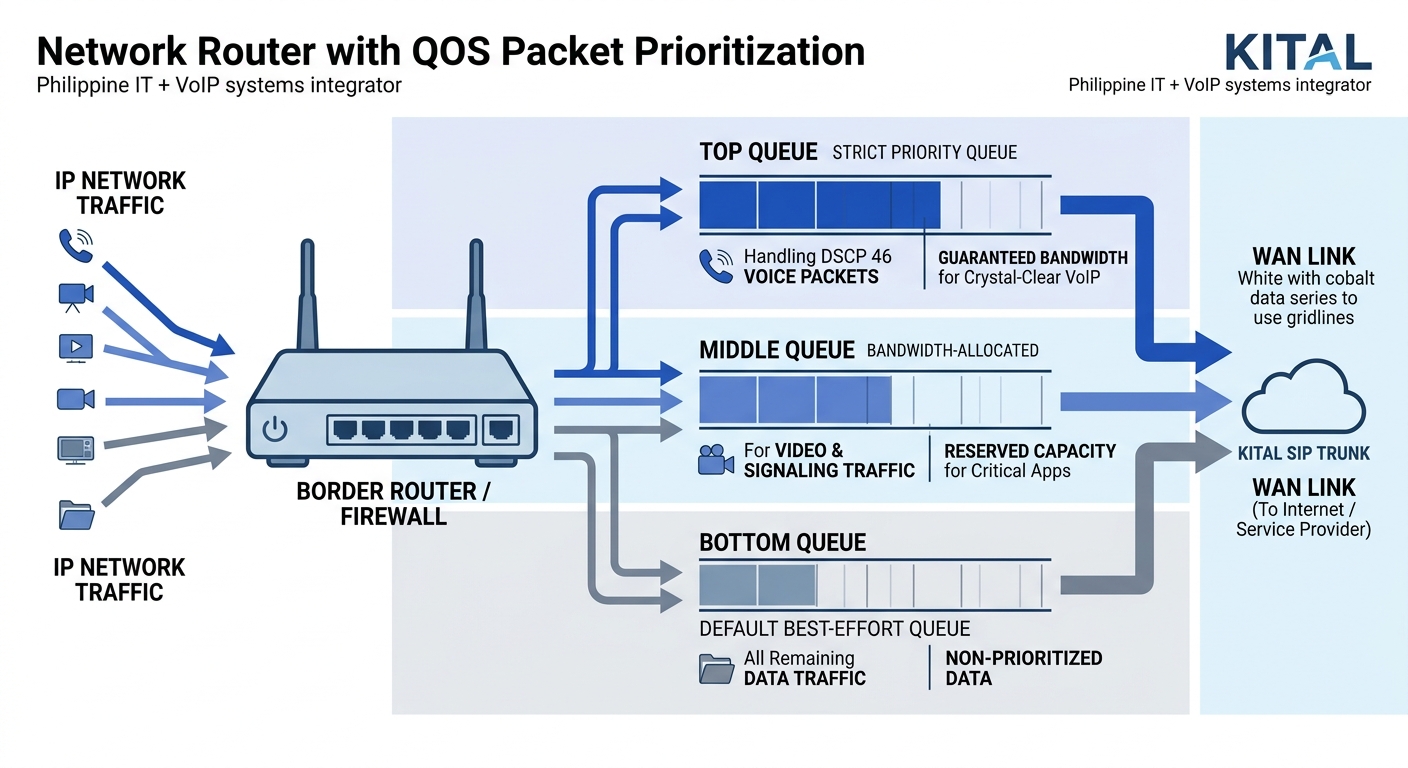
Marking packets is half the job. The other half is telling the router’s outbound interface what to do with those marked packets when congestion hits. This is where queuing mechanisms come in, and Low Latency Queuing (LLQ) is the standard approach for voice on Cisco routers.
LLQ gives DSCP 46 packets a strict priority queue. When voice packets arrive at the outbound interface, they jump ahead of all other traffic classes, ensuring they leave the router with minimal delay. Cisco routers implement this through a combination of class maps, policy maps, and service policies applied to WAN-facing interfaces. DrayTek routers take a simpler approach: you can enable first priority for VoIP SIP/RTP directly from the QoS settings page, specifying your SIP port if it differs from the default 5060.
The bandwidth math matters here. A single G.711 call consumes roughly 87 kbps (including IP, UDP, and RTP overhead). G.729 calls are lighter at around 32 kbps. For a BPO floor running 50 concurrent calls on G.729, you need at least 1.6 Mbps of guaranteed priority bandwidth. Oversubscribe the priority queue and the router starts dropping voice packets to protect other traffic classes, which defeats the entire purpose.
Tip: Allocate your priority queue bandwidth based on your maximum expected concurrent call count, not your average. If your busiest hour sees 80 simultaneous calls, size the queue for 80 calls plus a 20% buffer.
Cisco’s documentation also notes that RTP header compression can reduce the 40-byte IP/UDP/RTP header down to 2–4 bytes, which is especially useful on lower-bandwidth WAN links common in provincial Philippine branches. For a regional government office in Mindanao connected over a 10 Mbps circuit, header compression frees significant bandwidth for additional calls.
The ITU G.114 recommendation specifies that one-way latency should stay under 150 ms for acceptable voice quality, with packet loss below 1%. In practice, you want to target under 100 ms latency and under 0.5% loss. Jitter should stay below 30 ms, ideally under 10 ms. These aren’t aspirational numbers. They’re the threshold between a call that sounds professional and one where your customer hears robots.
Wireless Networks Need Their Own QoS Rules
Call quality optimization in the Philippines increasingly depends on getting wireless right, because office layouts in Metro Manila high-rises, Cebu IT parks, and Davao commercial centers frequently rely on Wi-Fi for softphones and mobile UC clients. Wired QoS policies don’t automatically extend to wireless.
Wi-Fi handles prioritization through WMM (Wi-Fi Multimedia), which defines four access categories: voice, video, best effort, and background. Voice gets the shortest contention window, meaning Wi-Fi frames carrying voice data wait less before transmitting. But WMM must be enabled on your access points, and your wireless controller needs to map DSCP 46 to the WMM voice access category.
Cisco Meraki’s wireless VoIP QoS best practices recommend creating traffic shaping rules per SSID and setting VoIP traffic to bypass per-client bandwidth limits entirely. They also recommend configuring voice SSIDs for the 5 GHz band only, because 2.4 GHz is more congested and introduces higher latency due to longer contention periods and interference from neighboring networks.
A single backup job or video stream can spike traffic and ruin call quality on an otherwise fast network. QoS is insurance against the unpredictable.
If your office uses a mix of Fanvil desk phones (wired) and Jabra Evolve headsets paired with laptops on Wi-Fi, you’re running two separate QoS domains. The wired path needs switch-level DSCP trust and router-level LLQ. The wireless path needs WMM mapping, band steering, and potentially a dedicated voice SSID with its own traffic shaping profile. Treating them as one problem guarantees you’ll miss half of it.
For environments where wireless voice quality remains poor despite correct QoS settings, the problem often traces back to RF design. Too few access points, co-channel interference, or clients roaming between APs mid-call all cause packet loss that QoS can’t fix. Proper network cabling infrastructure for AP backhaul and adequate AP density are prerequisites that must be solved before any software configuration will help.
What Happens at the ISP Boundary
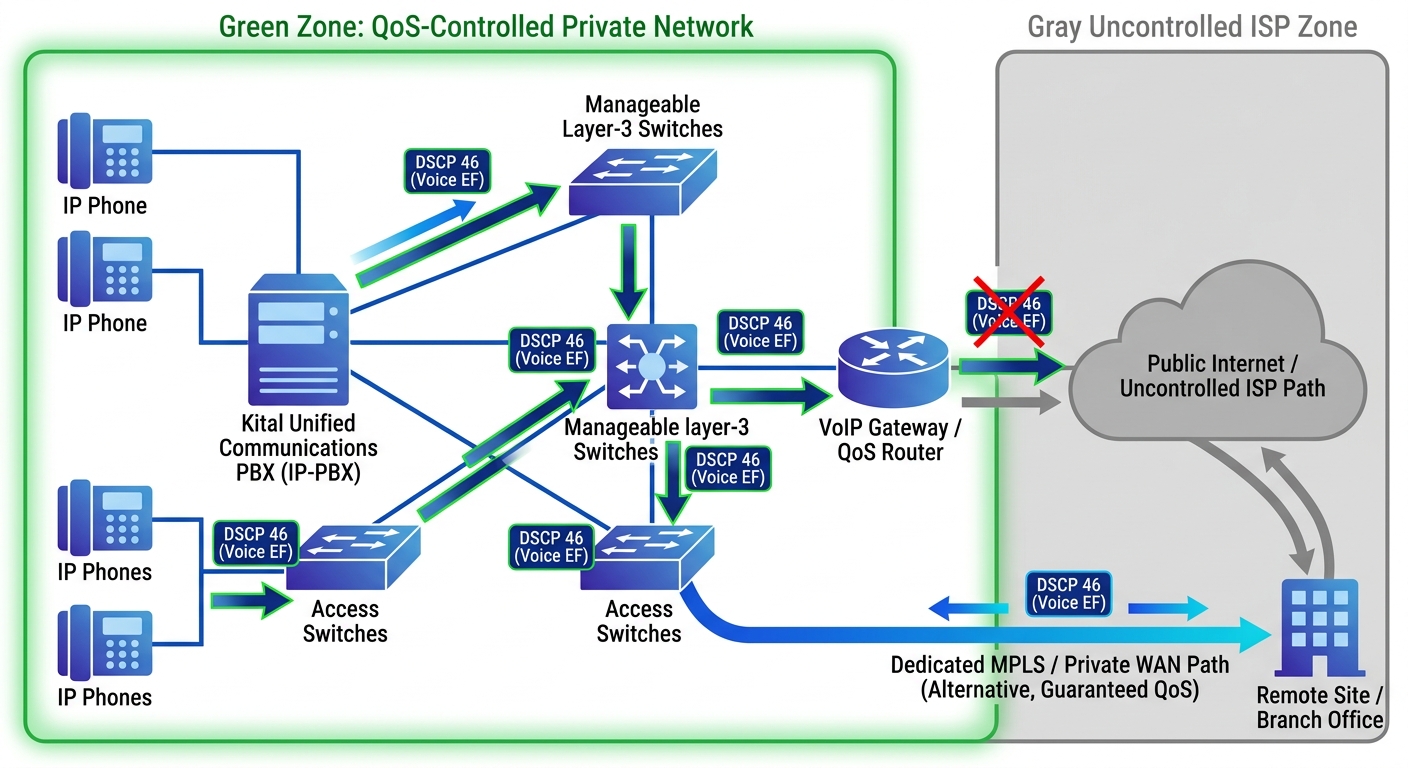
This is the part of VoIP QoS configuration that frustrates Philippine network administrators the most. You can mark, classify, queue, and shape traffic perfectly inside your LAN and on your WAN-facing interface. But the moment packets leave your router and enter your ISP’s network, your DSCP markings may be ignored or actively stripped.
Most Philippine ISPs, including PLDT Enterprise, Globe Business, and Converge, treat customer traffic as best effort unless you’ve purchased an SLA-backed service tier that honors DSCP markings. A standard business fiber connection gives you bandwidth, but it doesn’t promise to prioritize your DSCP 46 packets over someone else’s streaming traffic at the ISP’s aggregation point.
This means your internal QoS protects voice traffic from competing with your own data traffic on your WAN uplink. It ensures your 50 concurrent BPO calls aren’t starved by a 2 GB file upload to cloud storage. But it can’t protect those packets once they’re on the public internet.
For organizations where voice quality over the public internet is unacceptable, the workaround is straightforward: use dedicated SIP trunks with QoS-aware providers, deploy SD-WAN to select the best-performing path per call, or use MPLS circuits with guaranteed CoS. Philippine BPO operations handling international voice traffic almost universally run MPLS or dedicated SIP trunks for exactly this reason. If you’re weighing on-premise versus cloud-based PBX options, the ISP boundary question should factor heavily into that decision, because cloud PBX traffic traverses the public internet by default.
If you’re dealing with bandwidth contention on a shared internet link and wondering whether QoS alone will fix voice quality, the honest answer is: QoS solves the internal contention problem. It doesn’t solve an undersized or unreliable internet connection. You need enough total bandwidth and a stable enough path before QoS can do its job.
Where the Model Breaks
QoS for VoIP works well when three conditions hold: you control the network end-to-end, your bandwidth is sufficient for your concurrent call volume, and your physical infrastructure is stable. Remove any one of these, and the model fails in predictable ways.
Condition one: control. When calls traverse the public internet, you lose QoS enforcement. SD-WAN can mitigate this by duplicating packets across multiple paths and selecting the best one in real time, but it adds cost and complexity. For purely internal calls (branch-to-branch over MPLS, or extensions within a single site), QoS works as designed because you own every hop.
Condition two: bandwidth. QoS doesn’t create bandwidth. It redistributes what you already have. If your WAN link is 10 Mbps and your organization tries to run 200 concurrent G.711 calls (requiring roughly 17.4 Mbps of priority bandwidth), no amount of queuing policy will save you. The math has to work before the configuration does. We’ve written about diagnosing these kinds of capacity constraints when troubleshooting network congestion.
Condition three: physical stability. A fiber cut, a failing SFP module, or a flapping interface causes packet loss that QoS can’t mitigate. QoS manages congestion-induced quality degradation. It doesn’t repair hardware faults. Similarly, on wireless networks, QoS can’t compensate for poor RF coverage, excessive client density on a single AP, or 2.4 GHz interference from microwave ovens in a building’s break room.
There’s also a subtler failure mode specific to VoIP security: misconfigured QoS can inadvertently create a denial-of-service vector. If an attacker floods your network with packets marked DSCP 46, those packets enter the priority queue ahead of legitimate traffic. Proper classification should match on source (voice VLAN, known IP phone subnets) rather than blindly trusting any packet that arrives with a DSCP 46 marking.
The mechanism is elegant in scope and limited in reach. Within the boundaries you control, with adequate bandwidth and stable physical links, DSCP marking plus LLQ plus proper wireless QoS will keep voice quality consistent even when data traffic spikes. Outside those boundaries, every packet competes equally. Understanding exactly where that boundary sits on your specific network, and designing around it with the right mix of SIP trunks, MPLS, and SD-WAN, is what separates a VoIP deployment that works during a vendor demo from one that holds up on a Monday morning rush at a 500-seat BPO production floor.