
Three separate messaging apps, two video conferencing accounts, and a Yeastar IP-PBX that handles nothing except voice calls. That describes the daily reality inside a surprising number of mid-size Philippine companies that installed VoIP five or six years ago and assumed the communications problem was solved.
The voice part works. Calls connect, monthly bills dropped, and the old analog PBX went into storage. But everything around voice—chat threads, video meetings, screen sharing, presence indicators, file collaboration—still lives in disconnected tools that don’t talk to each other. When your BPO floor supervisor has to flip between Viber, Zoom, Outlook, and a desk phone to resolve one client escalation, the savings from VoIP start looking thin.
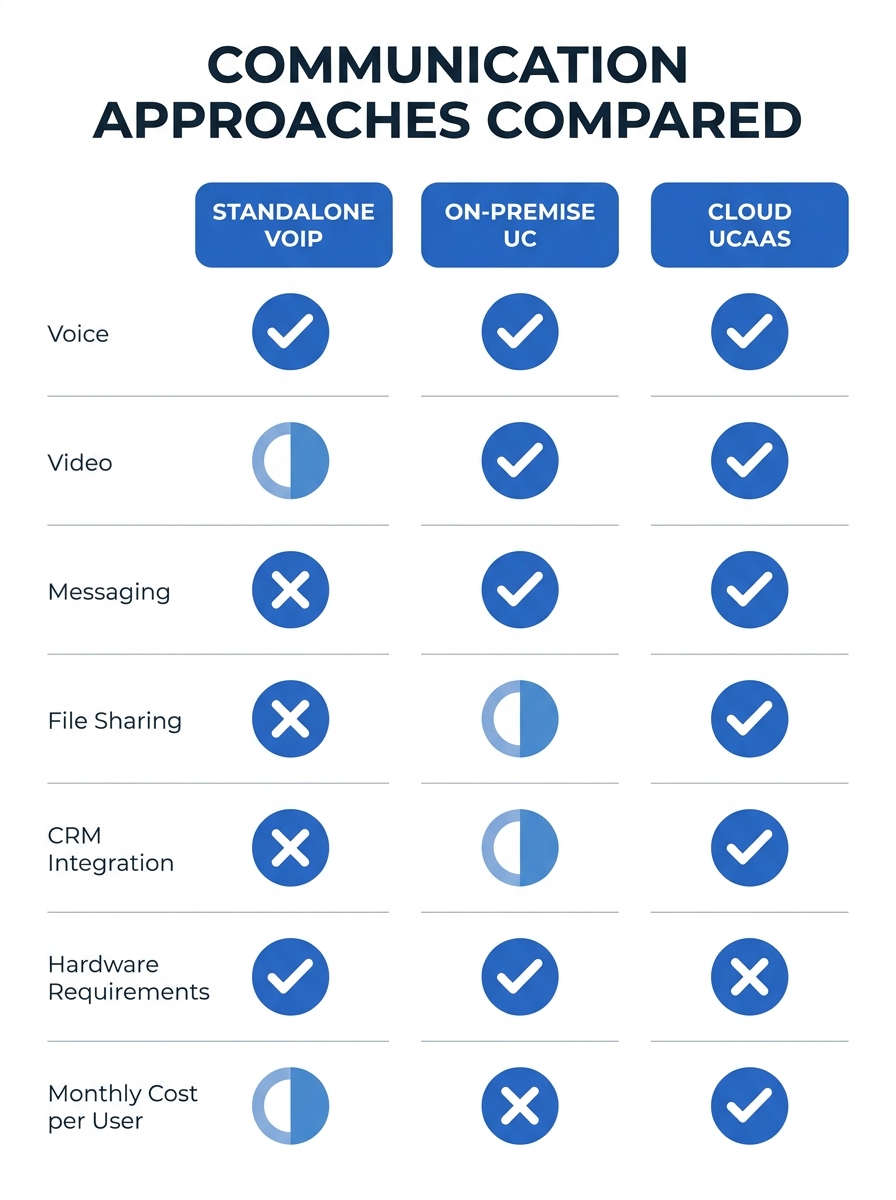
The debate around unified communications vs VoIP isn’t really about which technology is better in the abstract. It’s about which of three practical paths fits your organization right now: standalone VoIP, on-premise UC, or cloud-hosted UCaaS. Each path involves real trade-offs in cost, complexity, and capability. Here’s a direct comparison.
What Standalone VoIP Actually Covers
VoIP replaces your traditional phone lines with IP-based voice traffic. You get cheaper calls, easier number management, and features like auto-attendant, call recording, ring groups, and voicemail-to-email. Vendors like Yeastar, Grandstream, and Cisco offer solid IP-PBX systems that handle these functions well. For a 30-seat office in Makati or a small clinic in Cebu, standalone VoIP can be the right answer.
The IP telephony capabilities of a modern VoIP system are real. A Yeastar P-Series PBX, for example, supports SIP trunking, call queuing, IVR menus, and basic call center features out of the box. You can plug in Fanvil desk phones, configure QoS for voice traffic, and have a working phone system within a week. That speed of deployment matters when you’re replacing a failing analog system or opening a new branch office.
Where VoIP stops
The ceiling hits fast. VoIP handles voice. It doesn’t handle video conferencing, team messaging, presence (knowing who’s available before you call), document collaboration, or integration with your CRM or ticketing system. Each of those functions requires a separate tool, a separate login, and often a separate vendor relationship.
This fragmentation creates practical problems. A hotel front desk agent fielding a VIP guest complaint might need to call the housekeeping supervisor, check a maintenance ticket, and message the duty manager. With standalone VoIP, that’s three different applications. With UC, it’s one interface. The difference in resolution time is measurable. Organizations running hospitality communication platforms with integrated UC report faster cross-department coordination than properties relying on VoIP plus a patchwork of apps.
Who should consider standalone VoIP
Small to mid-size businesses with fewer than 50 users and limited IT staff. Companies where voice is genuinely the primary communication channel and there’s no plan to add video conferencing or team collaboration tools in the next two years. Government offices with strict procurement rules that make buying a bundled UC platform difficult. If you’re in this camp, a well-configured IP-PBX with proper network segmentation will serve you for years.
The honest risk: you’ll probably outgrow it. As Computer Weekly reported on ASEAN’s UC trends, Southeast Asia lags behind Australia and New Zealand in adopting cloud-based UC and IP voice, with many organizations still running on-premise systems. The region is catching up, though. And when your competitors add video support or integrate messaging into their workflows, standalone VoIP starts to feel like a constraint rather than a solution.
On-Premise UC Fills the Gaps VoIP Leaves Open
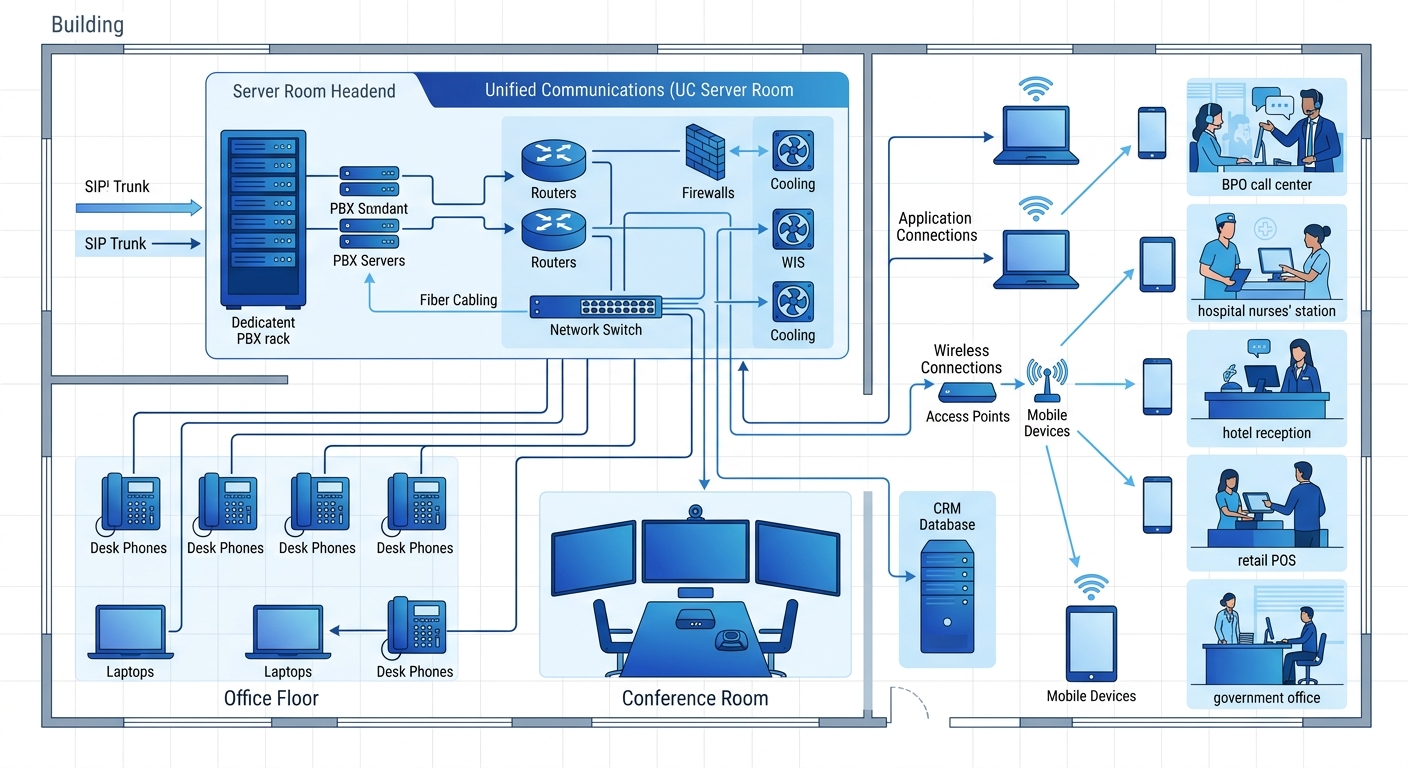
On-premise unified communications platforms bundle voice, video, messaging, presence, and sometimes contact center features into a single system you own and run in your server room. Cisco’s Unified Communications Manager, Avaya’s IP Office, and Yeastar’s P-Series (with its UC panel features) all fall into this category. You buy the hardware, license the software, and your IT team manages it.
The appeal is control. Your call data stays on your network. You decide when to patch, when to upgrade, and how to configure every feature. For organizations in regulated industries—banks under BSP oversight, hospitals handling patient data under the Data Privacy Act—this control matters. A hospital in Metro Manila running clinical telephony systems often needs to keep voice recordings and patient communication logs on local servers for compliance and audit purposes.
The integration layer is where on-premise UC earns its keep. When your Cisco UC platform connects to your Salesforce instance, an inbound call automatically pulls up the customer record. When your Avaya system integrates with your nurse call system, a patient pressing the bedside button routes to the right floor nurse’s handset and sends a notification to the charge nurse’s screen. As SmartChoice noted in their UC analysis, enterprise unified communications simplify IT management by pulling multiple communication tools into a single platform, which cuts administrative complexity and overhead.
The costs you need to budget for honestly
On-premise UC is expensive upfront. A Cisco UCM deployment for 200 users in a Davao BPO center can run PHP 3–5 million for hardware, licensing, and professional services before anyone makes a call. You also need in-house engineers who understand SIP, SRTP, certificate management, and whatever proprietary configuration your vendor requires. Matching a UC platform to your actual security model and change capacity takes genuine planning, not a weekend project.
Ongoing costs include maintenance contracts, software assurance renewals, and eventual hardware refresh cycles every five to seven years. Power and cooling for the server room add to the bill. And if you open a new branch in Iloilo, you’re either extending your system over a WAN link or deploying a secondary node.
When your BPO supervisor has to flip between four apps to resolve one escalation, the savings from VoIP start looking thin.
Who should consider on-premise UC
Enterprises with 100+ users, existing IT infrastructure teams, and regulatory or data-sovereignty requirements that make cloud hosting uncomfortable. Multi-site organizations that already run MPLS or SD-WAN connections between branches. Companies where the capital expenditure model fits better than operational expenditure—some Philippine CFOs still prefer owning depreciable assets to paying monthly subscriptions.
The honest risk: you’re carrying the maintenance burden. Every patch, every security update, every interoperability issue between your UC platform and your new CRM version lands on your team’s desk. If your senior voice engineer leaves, institutional knowledge walks out the door with them.
UCaaS and the Trade-Offs of Going Fully Cloud
Cloud-hosted UCaaS—unified communications as a service—puts the entire platform in a vendor’s data center. Microsoft Teams, Zoom Workplace, RingCentral, and 8×8 are the dominant players. You pay per user per month, and the vendor handles servers, patches, uptime, and feature updates. No server room, no hardware refresh cycles, no midnight emergency patches.
The global UCaaS market is growing fast, driven by SMEs and startups in countries like India and Southeast Asia looking for cost-effective, scalable solutions. For Philippine enterprises evaluating enterprise collaboration platforms, the Philippines-specific UCaaS landscape includes both international vendors (Microsoft, Zoom, Cisco Webex) and regional players with local data center presence.
UCaaS solves the fragmentation problem cleanly. Voice, video, chat, file sharing, and presence all live in one app. A call center agent in Quezon City and a remote supervisor in Baguio see the same interface, the same contacts, the same call history. Onboarding a new hire means creating one account instead of provisioning across four different systems.
The UCaaS adoption barriers Philippine enterprises face
UCaaS sounds ideal on paper. In practice, three barriers slow adoption in the Philippine market:
Internet reliability. UCaaS depends entirely on your internet connection. A branch office in a provincial city with a single ISP and no failover link will experience call drops during outages that an on-premise PBX would survive. You can mitigate this with dual ISP setups and SD-WAN, but those add cost and complexity that partially erode the “no infrastructure” promise of cloud.
Regulatory uncertainty. NTC and DICT guidelines around voice traffic, data localization, and lawful intercept aren’t always clear about cloud-hosted platforms. Some government agencies and financial institutions interpret existing rules as requiring on-premise voice recording storage. Until regulatory guidance catches up with cloud adoption, some organizations face genuine compliance friction.
Vendor lock-in. Moving your entire communication stack to one cloud vendor means your phone numbers, call recordings, chat history, and workflow integrations all live in their ecosystem. Switching vendors later is painful and expensive. Choosing a platform with open APIs and standard SIP trunk support reduces this risk, but doesn’t eliminate it.
Warning: Before signing a UCaaS contract, confirm where the vendor’s nearest data center sits. Routing voice traffic through a Singapore or Tokyo data center adds 40–80ms of latency on top of your local network conditions. For a BPO operation where call quality is a contractual SLA, that latency matters.

Who should consider UCaaS
Companies with 20–500 users that don’t have (or don’t want) a dedicated voice/UC engineering team. Organizations with distributed workforces across multiple Philippine cities where deploying on-premise gear at every site isn’t practical. Businesses in growth mode where adding 50 users next quarter shouldn’t require a hardware purchase order.
The honest risk: you’re dependent on your vendor’s roadmap, pricing decisions, and service quality. When Microsoft changes Teams’ licensing tiers or Zoom adjusts its per-user pricing, your annual communication budget changes with it—and you don’t get a vote.
Who Should Pick Which
There’s no universal right answer. The choice between standalone VoIP, on-premise UC, and UCaaS depends on five concrete factors:
User count and growth rate. Under 50 users with slow growth? Standalone VoIP works. Over 100 users or growing fast? On-premise UC or UCaaS makes more sense, because the per-user cost of managing fragmented tools gets worse as headcount rises.
IT team depth. If you have voice engineers on staff who understand SIP, SRTP, and your vendor’s configuration tools, on-premise UC gives you control and customization that cloud can’t match. If your IT team is three generalists handling everything from desktop support to firewall rules, UCaaS removes a category of work from their plate.
Regulatory requirements. Financial services, healthcare, and government agencies with strict data-handling rules should start with on-premise UC and evaluate cloud options only after confirming compliance. Everyone else should default to UCaaS unless there’s a specific reason not to.
Internet infrastructure. Run a speed and reliability audit on every site. If any branch has a single ISP link with less than 99.5% uptime, UCaaS becomes risky for that location. Consider a hybrid approach: UCaaS for your Metro Manila headquarters and major branches, with a local IP-PBX as a survivability node at sites with unreliable connectivity.
Budget structure. CapEx-friendly CFO who likes depreciable assets? On-premise UC fits the financial model. OpEx-oriented CFO who prefers predictable monthly costs? UCaaS aligns better.
The pattern we see across Philippine enterprises is convergence toward UC in some form. Standalone VoIP was the right first step for many companies migrating away from analog PBX systems. But as team collaboration, video conferencing, and CRM integration become operational requirements rather than nice-to-haves, the gap between VoIP and UC becomes harder to ignore. The real decision is whether you host it yourself or let a cloud vendor handle it—and that decision should follow from your IT capacity and regulatory posture, not from a vendor’s slide deck.
Whichever path you take, the communication stack only works as well as the network underneath it. Get the QoS, segmentation, and redundancy right first. The platform choice comes second.