
Calls that die at exactly 30 seconds point to one root cause: a SIP re-INVITE or BYE message blocked by NAT or firewall policy after initial call setup completes. The router’s UDP state table entry expires, and every subsequent signaling packet from the far end hits a closed port, killing the session.
Polycom Handsets, a Yealink Base Station, and an Invisible Timer
A well-documented pattern recurs across Philippine VoIP deployments and online troubleshooting forums alike: a mix of Polycom VVX 301 and 310 desk phones alongside a Yealink W52P cordless base station, all behind a single NAT gateway, all intermittently dropping registration throughout the business day. Rebooting one phone restores its registration but sometimes triggers deregistration on another handset. The behavior looks random. It isn’t.
The scenario, described in detail on r/VOIP, maps precisely to two converging failures that Philippine IT teams encounter when deploying enterprise phone systems on consumer or SMB-grade routers: a UDP NAT binding timeout that’s too short, and a SIP Application Layer Gateway (ALG) feature that rewrites packet headers without the admin’s knowledge or consent.
What makes this case worth dissecting is how the symptoms disguise the cause. The phones work fine after a reboot. The internet connection tests clean. Ping times to the SIP provider are normal. Every surface-level diagnostic says the network is healthy. But the calls keep dropping, and the phones keep losing their registrations at unpredictable intervals. The problem lives in two router behaviors that don’t show up in standard network monitoring: the NAT state table’s expiration clock and the ALG’s silent packet manipulation.
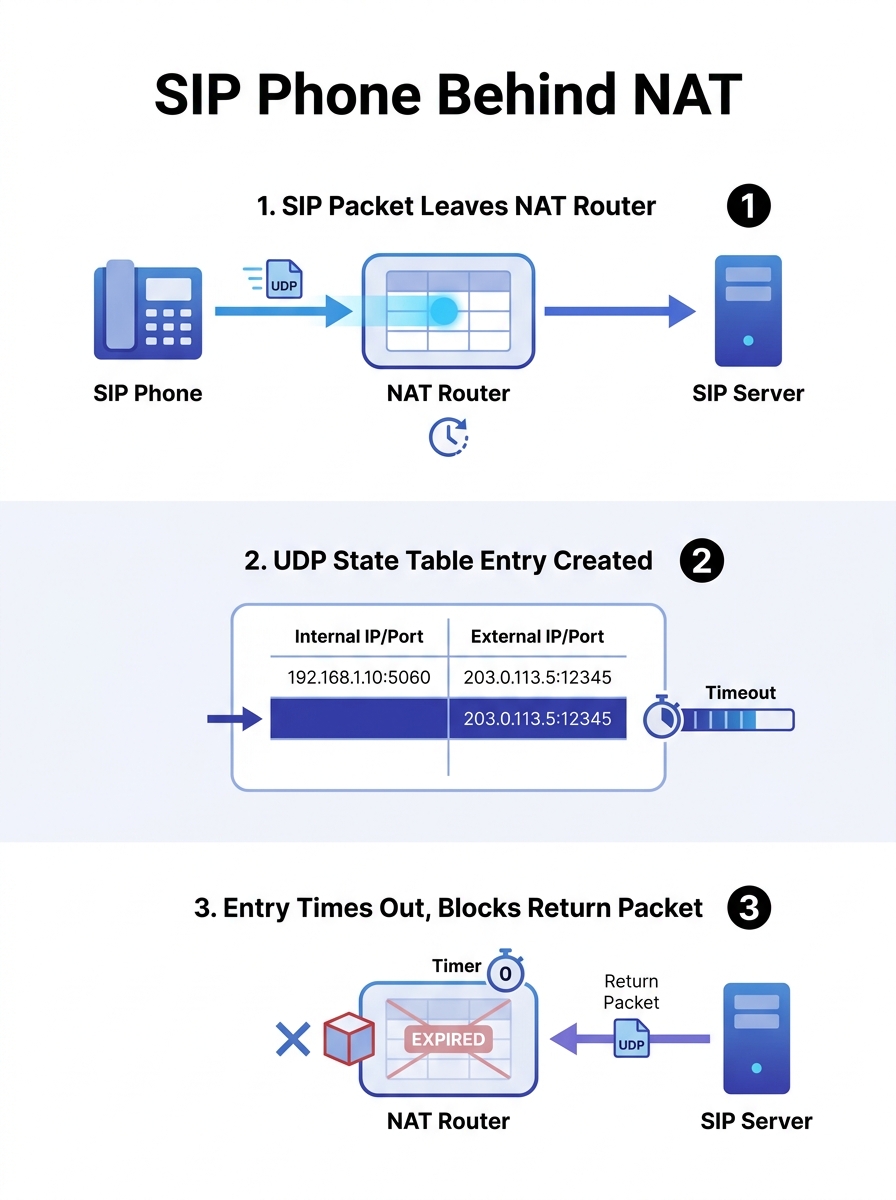
The NAT State Table’s Expiration Clock
UDP is stateless. Unlike TCP, which has explicit SYN, ACK, and FIN handshakes that tell a router when a connection opens and closes, UDP provides no such signals. So NAT devices improvise: when the first outbound UDP packet creates a mapping in the state table, the router starts a countdown timer. If no traffic crosses that mapping before the timer hits zero, the entry gets deleted. Any inbound packet arriving after deletion gets dropped silently.
The SIPSymposium troubleshooting guide documents that SIP’s Timer B (the INVITE transaction timeout) defaults to 64 times the T1 retransmission timer. With a standard T1 of 500 milliseconds, that’s 32 seconds. Some implementations shift T1 to 200 milliseconds (yielding a roughly 13-second timeout) or 1,000 milliseconds (roughly 64 seconds). If your calls consistently drop at one of those intervals, the diagnostic math is straightforward: divide the drop time by 64 to find the T1 value in play.
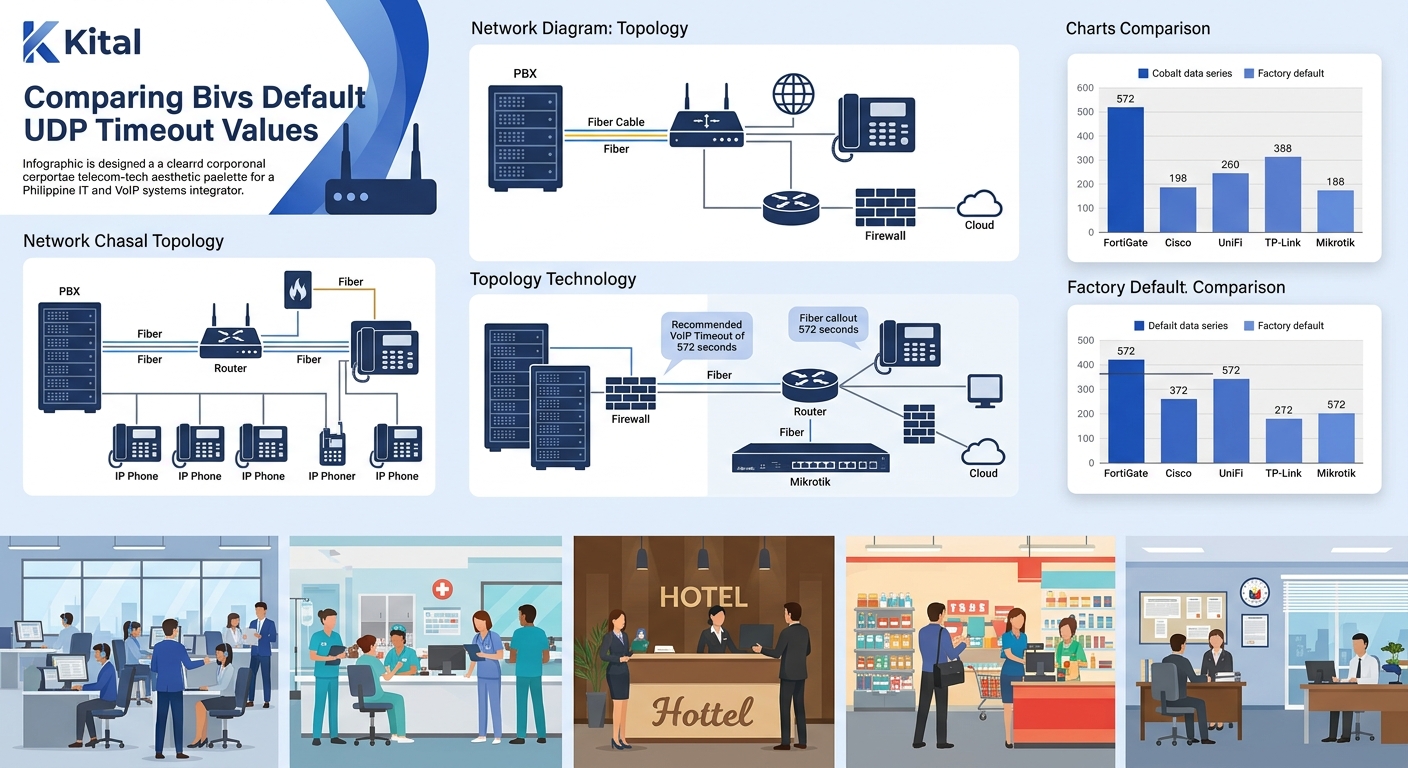
For Philippine enterprises running VoIP over PLDT, Globe, or Converge fiber circuits, the critical number is the router’s UDP session timeout. Many consumer and SMB routers ship with defaults between 30 and 180 seconds. FortiGate firewalls, common in BPO and mid-market deployments across Metro Manila and Cebu, default to UDP session timeouts that are too short for sustained voice sessions. The recommended minimum for VoIP is 572 seconds (roughly 9.5 minutes), and some administrators push FortiGate’s UDP timeout for ports 500 and 4500 to 60 minutes to eliminate mid-call and mid-registration drops entirely.
The arithmetic matters because SIP phones send periodic REGISTER messages to stay alive on the PBX. If a phone’s re-registration interval is set to 300 seconds (5 minutes) and the router’s UDP timeout is 120 seconds, there’s a 3-minute window where no SIP traffic crosses the NAT mapping. The router deletes the entry. The next REGISTER packet from the PBX to the phone arrives at the router, finds no matching state table entry, and gets dropped. The phone appears unregistered until it sends its own outbound REGISTER, which creates a new mapping. That’s why rebooting the phone “fixes” it temporarily. And that’s why router deregistration on Philippine networks tends to cluster during low-call-volume periods like lunch breaks and late afternoons, when handsets sit idle long enough for the NAT binding to expire.
If a phone’s re-registration interval is 300 seconds and the router’s UDP timeout is 120 seconds, there’s a 3-minute gap where the NAT binding dies and the phone silently drops off the PBX.
If you’ve been troubleshooting call quality on Philippine networks and the problem presents as intermittent one-way audio or silent deregistration rather than consistent jitter or packet loss, the NAT state table is the first place to look.
SIP ALG: The Silent Rewrite Engine
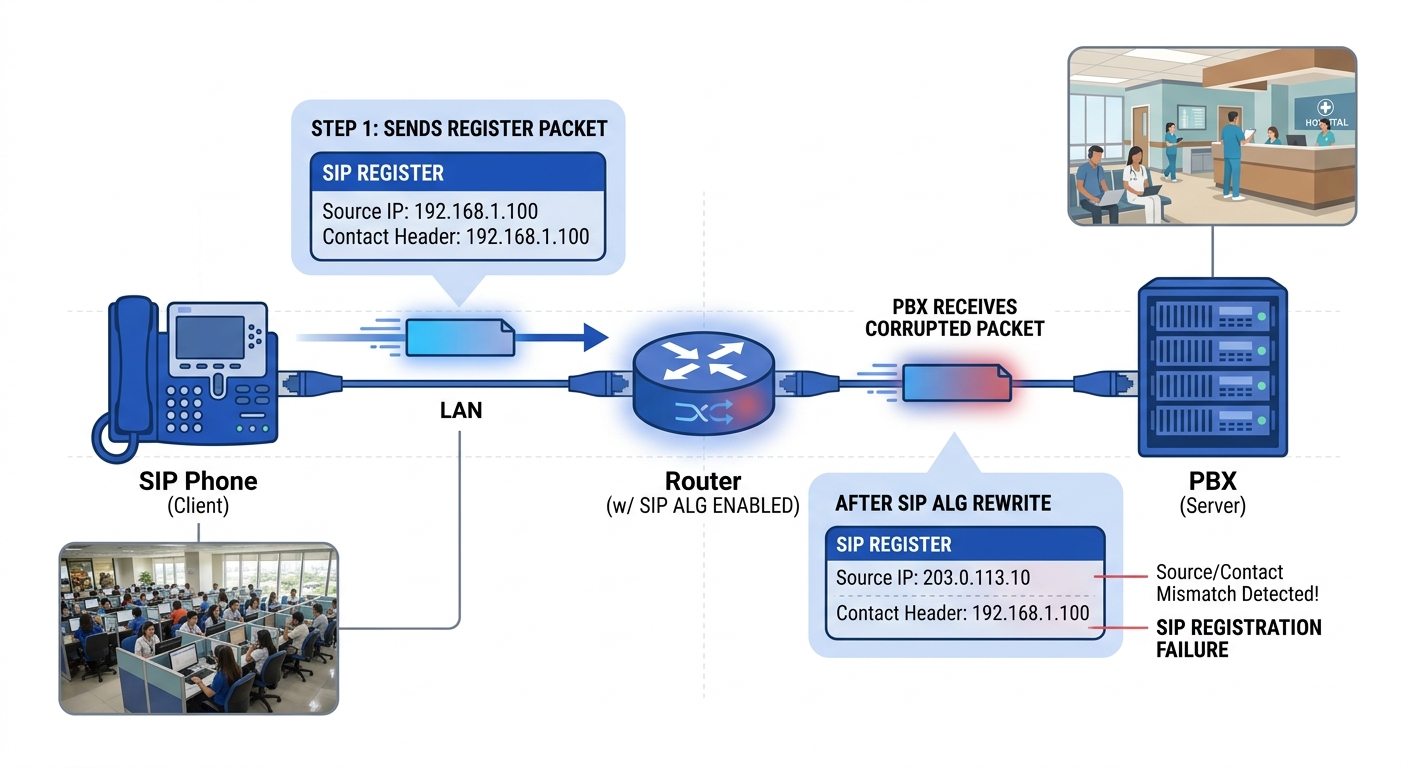
The second failure in the Polycom/Yealink case is subtler and more damaging. SIP ALG is a router feature designed to help VoIP traffic traverse NAT by inspecting SIP packets and rewriting the IP addresses and port numbers embedded in the SIP headers and SDP body. In theory, this solves the problem of private IP addresses appearing in SIP signaling, which would prevent the remote end from routing media back correctly. In practice, SIP ALG causes more VoIP failures than it prevents.
Nextiva’s technical documentation states it plainly: SIP ALG modifies the destination addresses of VoIP packets, causing reliability issues. The ALG intercepts the INVITE, rewrites the Contact header’s IP and port, sometimes changes the Via header, and occasionally mangles the SDP’s media description. The phone sends a perfectly valid SIP REGISTER. The ALG rewrites part of it. The PBX receives a packet with mismatched headers. Registration either fails outright or succeeds initially but breaks on the next re-INVITE.
The Viirtue 2026 VoIP guide for SMBs and MSPs confirms the industry consensus: “SIP ALG rewrites SIP headers and media details in ways that often break modern cloud VoIP. The fix is simple in most deployments: test for SIP ALG, disable it at the edge, and tune NAT timeouts and QoS.”
What makes SIP ALG misconfiguration especially frustrating for Philippine IT teams is that it produces maddeningly inconsistent symptoms. One phone registers fine. The phone next to it, same model, same firmware, drops its registration every 45 minutes. Calls complete from extension A to extension B but fail from B to A. Audio works for 20 seconds, then goes one-way. These aren’t random failures. They’re the predictable result of an ALG that rewrites some packets but not others, depending on packet size, timing, and which fields the ALG’s pattern-matching engine happens to catch.
If you’ve been running packet captures with Wireshark and seeing mismatched Contact headers or unexpected BYE messages at the 30-second mark, SIP ALG is the most likely culprit. The UDP Consulting knowledge base documents that “VoIP calls that drop consistently after exactly 30 seconds (or 32–35 seconds) are almost always caused by the same problem: a SIP re-INVITE or SIP BYE message is being blocked by NAT or a firewall after the initial call setup.”
Five Router Families and Their Default Sins
The specific routers that cause the most trouble in Philippine enterprise VoIP deployments share a common trait: SIP ALG is enabled by default, and the setting to disable it is buried, poorly documented, or in some cases only accessible through the CLI.
Fortinet FortiGate. SIP ALG is active by default. The GUI sometimes doesn’t expose the toggle clearly, so administrators who’ve checked every visible setting still have ALG running. Disabling it requires CLI access. The default UDP session timeout is also too short for VoIP keep-alive intervals, as noted above.
Ubiquiti UniFi Security Gateway and UDM series. SIP ALG ships enabled. The UniFi controller interface provides a toggle, but some firmware versions have reset it silently after updates. Philippine BPOs running UniFi for branch offices have reported SIP protocol failures that persisted through multiple firmware cycles until they verified ALG was actually off post-update, not just toggled off once.
TP-Link Archer series (consumer/SOHO). Common in smaller Philippine offices and satellite branches. SIP ALG is enabled by default. The setting is in the NAT section, labeled “ALG” with checkboxes for individual protocols. UDP timeout values default to 60 seconds on many models.
Mikrotik RouterOS. SIP ALG (specifically the SIP helper and connection tracking module) is active by default. Disabling it requires removing the SIP helper from the connection tracking configuration, a step that’s well-documented in Mikrotik forums but unknown to most Philippine network installers who configure these routers through WinBox’s graphical interface.
Cisco RV series (small business). SIP ALG is on by default in most firmware versions. The web interface provides a toggle, but Cisco’s documentation for this line is minimal compared to their enterprise IOS documentation.
Warning: After any firmware update on your router or firewall, verify that SIP ALG is still disabled. Multiple router families are known to re-enable ALG silently during firmware upgrades.
For enterprises evaluating Yeastar PBX systems or any cloud-hosted SIP trunk deployment, the router’s ALG and timeout defaults should be checked before the PBX is even unboxed. A properly configured PBX behind a misconfigured router will fail in ways that look identical to a PBX configuration error, wasting days of troubleshooting effort in the wrong direction.
Sixty-Minute Timeouts and a Disabled ALG
The resolution for the Polycom/Yealink registration-loss pattern came down to three configuration changes applied to the edge router, with no changes needed on the PBX or the phones themselves.
First, disable SIP ALG completely. On FortiGate, this means accessing the CLI and disabling the SIP application layer gateway explicitly. On UniFi, it means toggling the setting off in the controller and then verifying through a packet capture that SIP headers are passing through unmodified. On Mikrotik, it means removing the SIP helper from the connection tracking helper list. The method varies by vendor. The principle doesn’t.
Second, increase the UDP session timeout. For FortiGate firewalls, extending UDP session timeouts for SIP and RTP ports to at least 600 seconds (10 minutes) eliminates the state-table expiration problem for phones with standard 300-second re-registration intervals. Some administrators set it to 3,600 seconds (60 minutes) for deployments where phones sit idle for long stretches. On consumer routers that don’t expose granular per-port timeout controls, setting the global UDP timeout to 600 seconds is the fallback.
Third, set phone keep-alive intervals to 20–30 seconds. This is the belt to the suspenders. Even if the router’s UDP timeout is extended, configuring each phone to send a keep-alive or OPTIONS ping every 20 to 30 seconds ensures the NAT binding never goes stale. On Polycom VVX phones, this is the “Reg Expire” and “Line Seize Timeout” parameter. On Yealink handsets, it’s the keep-alive interval in the SIP account settings.
These three changes work together. Disabling SIP ALG stops the packet mangling. Extending the UDP timeout stops the NAT binding from expiring during idle periods. Shortening the keep-alive interval provides a safety margin even if the timeout configuration isn’t perfect.
For deployments where the router also handles QoS for voice traffic, confirm that the QoS rules prioritize UDP traffic on your SIP and RTP port ranges (typically 5060 for SIP and 10000–20000 for RTP, though these vary by PBX vendor). QoS doesn’t solve NAT timeout issues directly, but it prevents a separate failure mode where UDP voice packets get dropped during bandwidth congestion because the router treats them as best-effort traffic.
The broader lesson from this case applies to every Philippine enterprise running SIP-based telephony behind a NAT gateway. The PBX software, the SIP trunk provider, the handset firmware, and the network uplink can all be configured perfectly and still produce dropped calls and ghost deregistrations if the edge router’s UDP timeout is too short or its SIP ALG is silently rewriting packets. When you’re evaluating VoIP security controls before go-live, add “verify SIP ALG is disabled” and “confirm UDP timeout exceeds 572 seconds” to the checklist. These two settings account for a disproportionate share of the mysterious, intermittent VoIP failures that get blamed on everything from the ISP to the PBX vendor to solar flares. The root cause is almost always the router sitting between them.