
Phantom offline status—where VoIP phones cycle between registered and unregistered without any physical network disruption—is a SIP timer alignment problem. It happens when a firewall’s UDP session timeout expires before the phone sends its next REGISTER message, causing the PBX to treat a perfectly functional endpoint as dead.
The Timer Mismatch That Creates Ghost Endpoints
Every SIP phone maintains its presence on the PBX through periodic REGISTER messages. The phone sends a REGISTER request, the PBX acknowledges it and sets an expiration timer (commonly 3,600 seconds, though Yeastar and Fanvil devices often ship with defaults between 60 and 300 seconds), and the phone must re-register before that timer runs out. If the next REGISTER doesn’t arrive in time, the PBX marks the extension offline. The phone, meanwhile, sits on a desk in Makati or Cebu IT Park, fully powered, fully connected, showing a healthy LAN link on its display. From the user’s perspective, nothing happened. From the PBX’s perspective, that extension no longer exists.
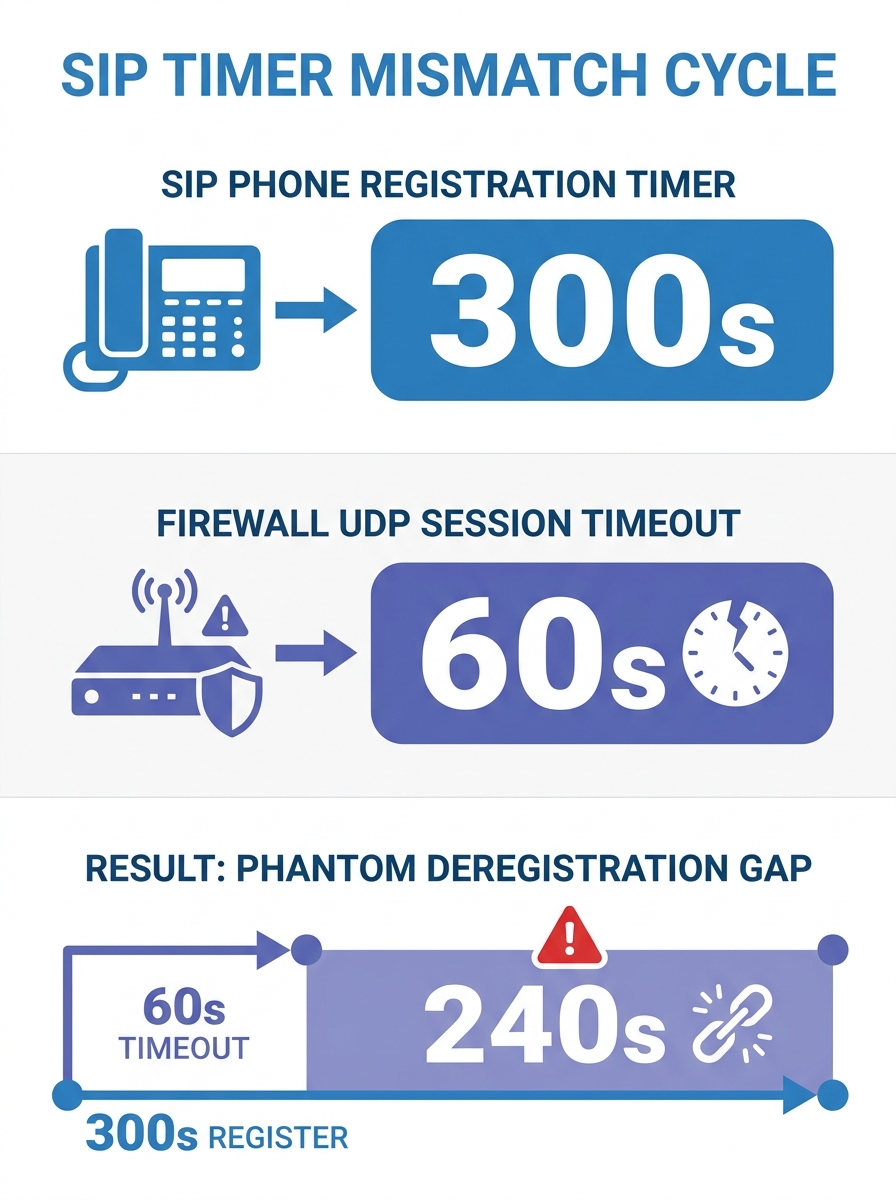
The gap between these two realities is where SIP deregistration becomes an infrastructure-level problem rather than a device-level one. The phone did attempt to re-register. It sent the REGISTER packet exactly when it was supposed to. But that packet never reached the PBX because the stateful firewall between them had already torn down the UDP session. As SonicWall’s knowledge base documents, the UDP timeout value on the firewall governs how long a session entry stays in the connection table. If the phone’s re-registration interval is 300 seconds but the firewall’s UDP timeout is 60 seconds, the session table entry for that SIP flow disappears after 60 seconds of inactivity. The phone’s next REGISTER, arriving 300 seconds later, looks like a brand-new unsolicited inbound packet. Depending on firewall policy, it gets dropped, NATed to a wrong internal address, or silently discarded.
This is the core mechanism behind phantom VoIP phone offline status in Philippine enterprise networks, and it’s remarkably common. Administrators at BPO operations running 200 to 500 seats see 5 to 15 extensions flicker offline per hour during shift changes when network traffic patterns shift. The instinct is to blame the phones, the PBX, or the ISP. The actual culprit is a 60-second default timer buried three menus deep in the firewall configuration.
Why the Firewall Is Almost Always the First Place to Look
Philippine enterprise networks share a set of deployment patterns that make SIP deregistration cycles especially persistent. Most offices run FortiGate, Cisco ASA, or SonicWall appliances at the network edge, and all three ship with conservative UDP timeout defaults. FortiGate’s default is 180 seconds. pfSense defaults to 60 seconds for bidirectional UDP flows. Cisco ASA sits at 120 seconds. These defaults are reasonable for general UDP traffic like DNS queries, which complete in milliseconds. They are destructive for SIP, which requires persistent sessions measured in minutes or hours.
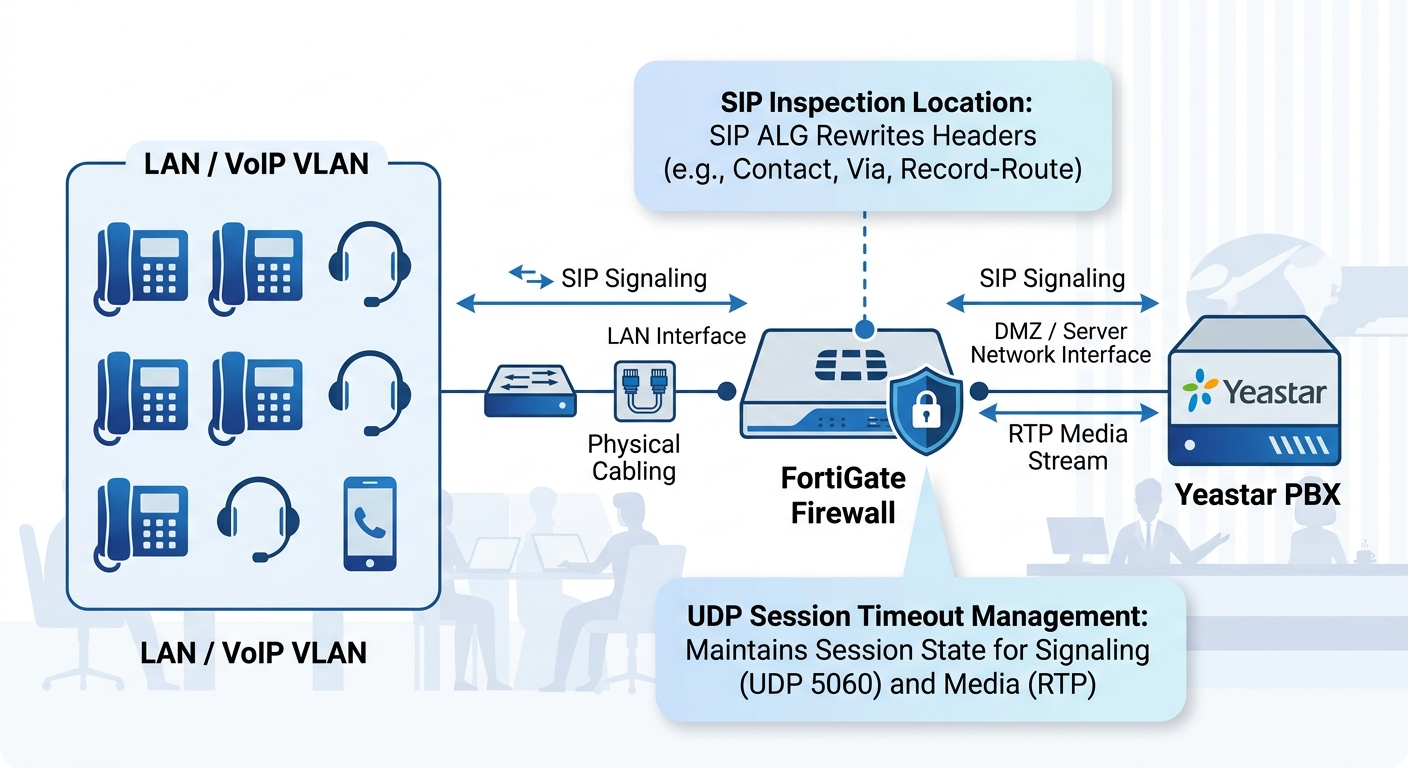
The fix sounds simple: raise the UDP session timeout. Experienced administrators push this to 900 seconds as a conservative adjustment, or all the way to 3,600 seconds to match common SIP registration expiry values. But the fix often fails because a second mechanism interferes: SIP Application Layer Gateway processing. As Dialpad’s troubleshooting documentation explains, the ALG rewrites SIP headers as packets traverse the NAT boundary, substituting internal IP addresses with external ones. In theory, this helps. In practice, SIP ALG implementations on most firewall platforms mangle the Contact header, the Via header, or both, causing the PBX to associate the registration with an unreachable address. The phone registers successfully, but when the PBX tries to send an INVITE for an incoming call, it sends it to the ALG-rewritten address rather than the phone’s actual NAT mapping. The call fails. The phone looks online on the dashboard but can’t receive calls, which is arguably worse than showing offline because nobody knows it’s broken.
If you’re running a FortiGate and dealing with intermittent call failures alongside phantom deregistration, the first diagnostic step is checking whether SIP ALG is enabled and disabling it. We’ve covered how NAT traversal and UDP timeouts interact on specific router models in detail before, and the pattern holds across nearly every FortiGate deployment we’ve seen in Metro Manila and Cebu. Disable the ALG, configure your PBX’s SBC module for direct NAT traversal, then align the UDP timeout to exceed the SIP registration interval by at least 30%. If the phone registers every 300 seconds, set the firewall UDP timeout to 400 seconds minimum. If the phone registers every 3,600 seconds, the UDP timeout needs to exceed 4,000 seconds.
There’s a secondary failure mode worth understanding: DHCP lease conflicts. Enterprise networks running Cisco Catalyst switches with short DHCP lease times (common in Philippine hotel and hospital deployments where devices connect and disconnect frequently) can reassign a phone’s IP address mid-registration. The PBX holds a binding between the extension number and the IP address from the last REGISTER. When the DHCP server reassigns that IP to a laptop, the PBX sends incoming call INVITEs to a laptop that has no idea what to do with SIP traffic. The extension shows registered on the PBX dashboard because the registration hasn’t expired yet, but calls go nowhere. Fixing this requires either static IP assignments for VoIP phones (impractical above 50 endpoints) or DHCP reservations tied to MAC addresses, with lease times set to at least 86,400 seconds (24 hours) for voice VLANs.
Running Enterprise VoIP Diagnostics Without Guessing
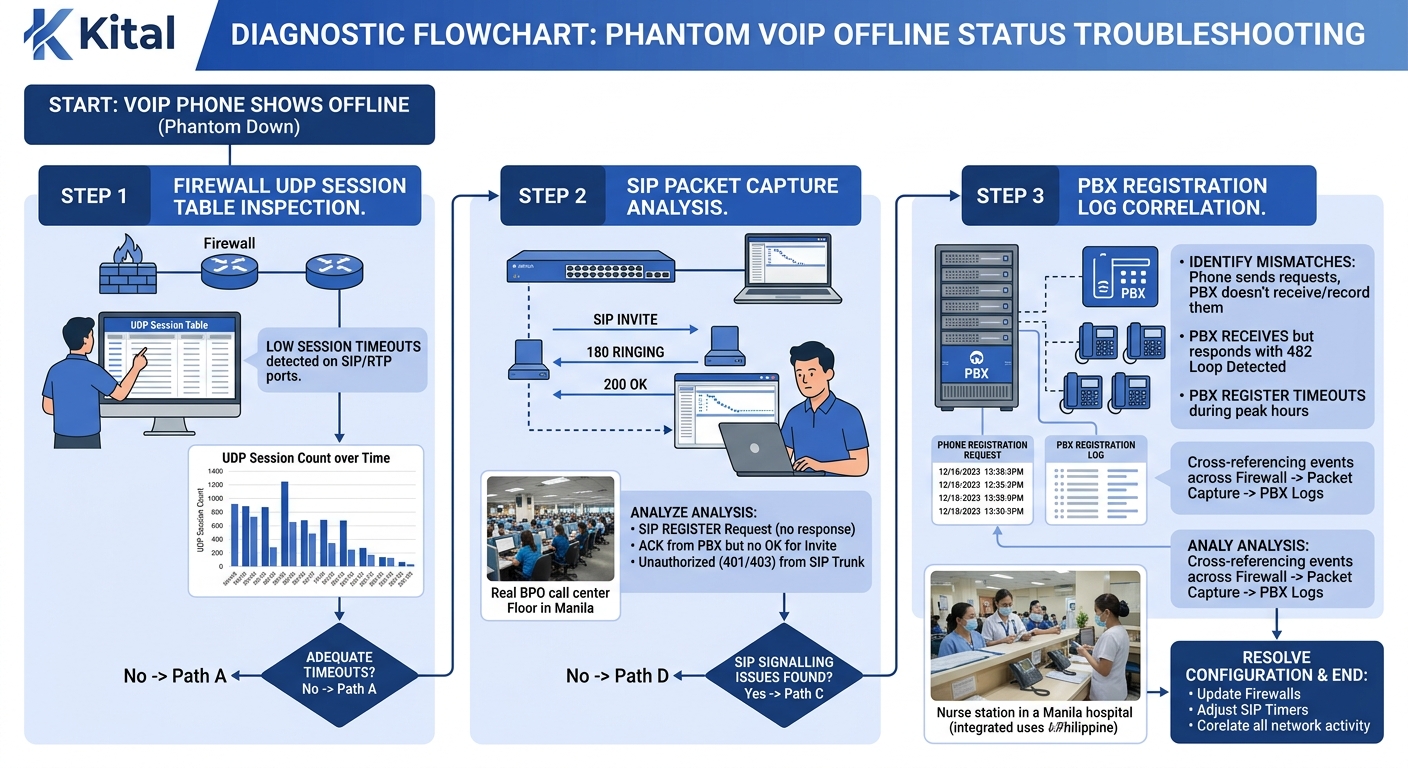
Diagnosing phantom offline status requires a specific sequence, and getting the order wrong wastes hours. The temptation is to start at the phone, checking firmware versions and registration settings. That’s the wrong end of the problem. Start at the firewall. Pull the UDP session table and look for SIP-related entries. If you see entries being created and torn down within 60 to 180 seconds while the phone’s registration interval is longer, you’ve found the mismatch. On SonicWall appliances, you can verify this by navigating to the packet monitor under Investigate and filtering for traffic on port 5060 or 5061.
If the session table looks healthy—entries persist through the registration cycle—move to a packet capture on the PBX itself. Enterprise VoIP diagnostics at this layer means capturing SIP REGISTER messages and examining the response codes. A 401 Unauthorized response followed by a valid credentials re-submission and a 200 OK is normal (that’s SIP digest authentication working as designed). A 403 Forbidden response indicates the phone’s credentials have been locked out, which happens after repeated failed registration attempts. Yeastar’s support documentation confirms that extension registration failures caused by incorrect passwords will trigger progressive IP blocking after multiple failed attempts, compounding the phantom offline problem: the phone tries to re-register, fails due to bad credentials, gets its IP blocked, and then every subsequent registration attempt from that IP fails regardless of whether the credentials are correct.
The phone tries to re-register, fails due to bad credentials, gets its IP blocked, and then every subsequent registration attempt from that IP fails regardless of whether the credentials are correct.
Power cycling a phone resolves the immediate symptom by forcing a fresh registration from a clean state, as Nextiva’s troubleshooting guide documents. But this is triage, not treatment. If you’re power-cycling phones weekly, you have an underlying UDP timeout configuration problem, a credential synchronization issue between your provisioning server and your PBX, or both. The diagnostic question isn’t “how do I get this phone back online?” It’s “why did the PBX lose track of a phone that never disconnected?”
For organizations running 100 or more extensions—typical for a mid-sized BPO floor in Pasig or a provincial government agency—manual diagnostics don’t scale. You need registration monitoring at the PBX level. Both Yeastar P-Series and Cisco UCM expose registration event logs that can be polled via API or syslog. Building a root-cause analysis workflow using packet captures at the network layer and correlating those captures with PBX registration logs gives you the full picture: the phone sent a REGISTER at timestamp X, the firewall’s session table shows the entry was torn down at timestamp Y (before X), and the PBX never received the message. Three data points, one conclusion.
There’s a security dimension here too. Automated tools that cycle through IP ranges sending SIP REGISTER messages with common username and password combinations can trigger the same IP-blocking behavior that legitimate failed registrations cause. If your SBC or PBX doesn’t differentiate between registration scanning attacks and legitimate registration failures, a brute-force attempt against one extension can cascade into blocking the entire subnet. As TelcoBridges’ VoIP security guide documents, SIP registration scanning protection is a distinct security function from generic rate limiting, and most PBX platforms don’t enable it by default.
Where Certainty Runs Out
The timer alignment fix—matching UDP timeout configuration to SIP registration intervals—resolves the majority of phantom offline cases. But it doesn’t resolve all of them. There’s a class of deregistration failures that surface specifically in Philippine networks using asymmetric internet connections from providers like PLDT Enterprise and Globe Business, where upstream bandwidth is a fraction of downstream. SIP REGISTER messages are tiny (typically under 1 KB), so bandwidth shouldn’t be the bottleneck. Yet on congested uplinks during peak hours (10:00 AM to 2:00 PM in most BPO operations), these small packets compete with outbound data traffic and occasionally get dropped. QoS marking should fix this, and we’ve written about how to configure proper traffic prioritization for SIP signaling on enterprise routers. But QoS only works within your own network. Once the REGISTER packet leaves your edge router and enters the ISP’s network, your DSCP markings are typically stripped. Whether the ISP re-marks or respects those markings is an open question that varies by provider, by region, and sometimes by time of day.
There’s also the firmware dimension. Fanvil X-series phones running firmware versions below 2.12.0.x have a documented behavior where the phone’s internal registration timer drifts by 2 to 5 seconds per hour under sustained operation, eventually accumulating enough drift that the phone sends its REGISTER message after the PBX has already timed out the registration. A firmware update fixes the drift, but as Beacon Telecom’s troubleshooting documentation warns, all VoIP phones should be re-registered and monitored after firmware updates because the update process itself can reset registration parameters to factory defaults. You fix the timer drift and accidentally revert the registration interval to 60 seconds, re-creating the firewall timeout mismatch you just solved. Careful change management during firmware rollouts matters here, and organizations managing large deployments should treat firmware updates with the same structured approach they’d apply to scaling their telephony infrastructure.
The uncomfortable truth about network registration failures in enterprise VoIP is that the problem is fully solvable in controlled environments and only partially solvable in real ones. A lab bench with a phone, a switch, a firewall, and a PBX will never produce phantom offline status once the timers are aligned. A production network with 300 phones, three ISP uplinks, two firewalls in HA failover, asymmetric bandwidth, DHCP scopes managed by a different team, and a SIP ALG that a junior admin re-enabled during a firewall policy update last Tuesday—that network will produce phantom deregistration events that resist clean diagnosis. The gap between theory and production is where enterprise VoIP diagnostics actually lives, and anyone selling you a single-variable fix for a multi-variable environment is oversimplifying.