
Every SIP registration failure your help desk logs as a “phone issue” is almost certainly a network infrastructure problem, and the fix lives in your firewall configuration, not your PBX.
This claim runs against the instinct of most IT teams. When forty Yealink or Fanvil handsets across a BPO floor in Makati go offline at 2 PM and re-register by 2:15 PM, the ticket gets routed to whoever manages the IP PBX. The PBX admin checks credentials, restarts the service, maybe reboots the phones. Everything looks fine for a day. Then it happens again. The cycle repeats because the investigation starts in the wrong place.
VoIP deregistration events that come and go on an irregular schedule point to three specific network-layer culprits: firewall session timeouts expiring SIP bindings, DNS resolution delays interrupting re-registration, and SIP ALG mangling packets in transit. Each one creates identical symptoms at the phone: a brief offline status, missed inbound calls, and a registration recovery that looks spontaneous. And each one requires a different fix that has nothing to do with PBX configuration.
Firewall UDP Timeouts Are the Primary Offender
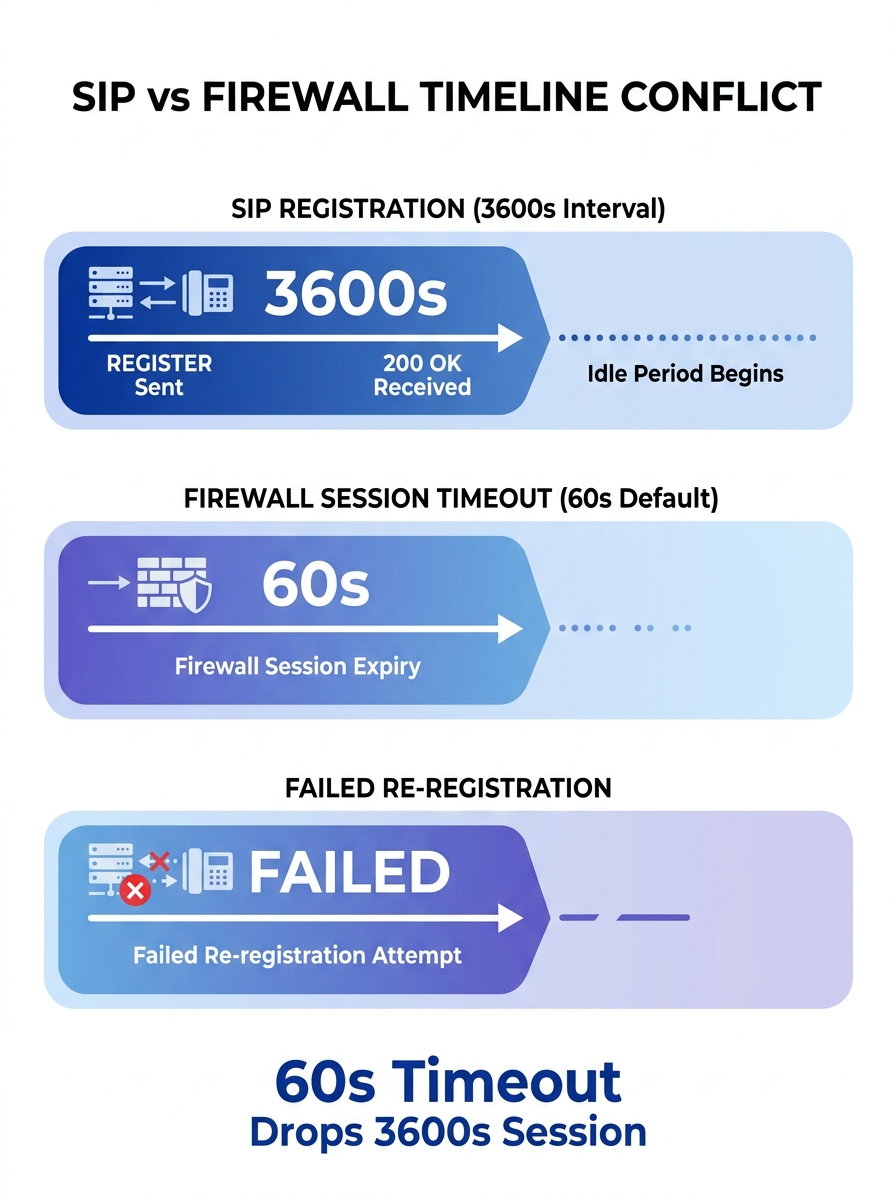
SIP registration works by having each IP phone send a REGISTER message to the PBX or SIP server at regular intervals. The server responds with a 200 OK and a registration expiry timer, typically 3600 seconds (one hour). Between those registration renewals, the phone sits idle on the network, maintaining a UDP session through whatever firewall sits between it and the server.
Here’s where Philippine enterprise networks run into trouble. Firewalls — Fortinet FortiGates, Cisco ASAs, Palo Alto boxes, even pfSense appliances — maintain a state table that tracks active UDP sessions. When a UDP session shows no traffic for a defined period, the firewall drops it from the table. The default UDP timeout on many firewalls sits between 30 and 120 seconds.
Do the math. If your phones register every 3600 seconds but your firewall kills idle UDP sessions after 60 seconds, the firewall discards the NAT binding long before the phone’s next registration attempt. When the phone finally tries to re-register, the return path through the firewall no longer exists. The REGISTER packet goes out, the server responds, but the response gets dropped at the firewall because there’s no matching session entry. The phone shows “offline” until it retries enough times for a new session to form.
The fix involves aligning your UDP timeout configuration with your SIP registration interval. Network engineers deploying VoIP behind Palo Alto firewalls have documented setting TCP and UDP session timeouts to 660 seconds specifically for voice traffic. A practical guideline from networking practitioners: find your phone’s SIP keepalive interval and set the UDP timeout to two to three times that value.
For a 200-phone BPO deployment in Cebu or a government agency in Quezon City, this single change can eliminate the majority of intermittent registration drops overnight.
Keepalive Settings on the Phone Side
You can also attack this from the device side. Phones from Yealink, Fanvil’s SIP phone range, and Grandstream all support SIP keepalive or NAT keepalive timers. These send small packets (typically OPTIONS or empty UDP packets) at intervals short enough to prevent the firewall from expiring the session. Setting a keepalive interval of 30 seconds means the firewall sees traffic every 30 seconds and never drops the binding.
If your network uses QoS policies, make sure these keepalive packets get the same DSCP marking as regular SIP traffic. We’ve covered the details of configuring QoS for VoIP on Philippine networks separately, but the short version is: if your QoS policy drops or deprioritizes keepalive packets, you’ve solved nothing.
DNS Resolution Delays Kill Registrations Silently
The second evidence point is subtler and harder to catch without packet captures. When an IP phone needs to register (or re-register) with the SIP server, it first resolves the server’s domain name to an IP address. If the DNS server is slow, unresponsive, or returning stale records, registration fails with a timeout before the phone ever sends a REGISTER message to the PBX.
Philippine enterprises often hit this when they rely on ISP-provided DNS servers from PLDT or Globe that experience intermittent latency spikes during peak hours. A DNS query that normally completes in 5 milliseconds suddenly takes 4 seconds. The phone’s SIP stack, which typically waits only 2 to 3 seconds for DNS resolution before timing out, gives up and reports a registration failure. From the user’s perspective, the phone went offline for no reason. From the PBX’s perspective, the phone simply stopped sending REGISTER messages.
The diagnostic test is straightforward: temporarily configure one or two phones to use the SIP server’s IP address directly instead of the domain name. If those phones stop dropping offline while domain-configured phones keep failing, DNS is the cause. The important caveat is that you shouldn’t leave phones configured with static IP addresses permanently. SIP providers use DNS to redirect traffic during server failovers, and bypassing DNS means your phones can’t follow those redirects.
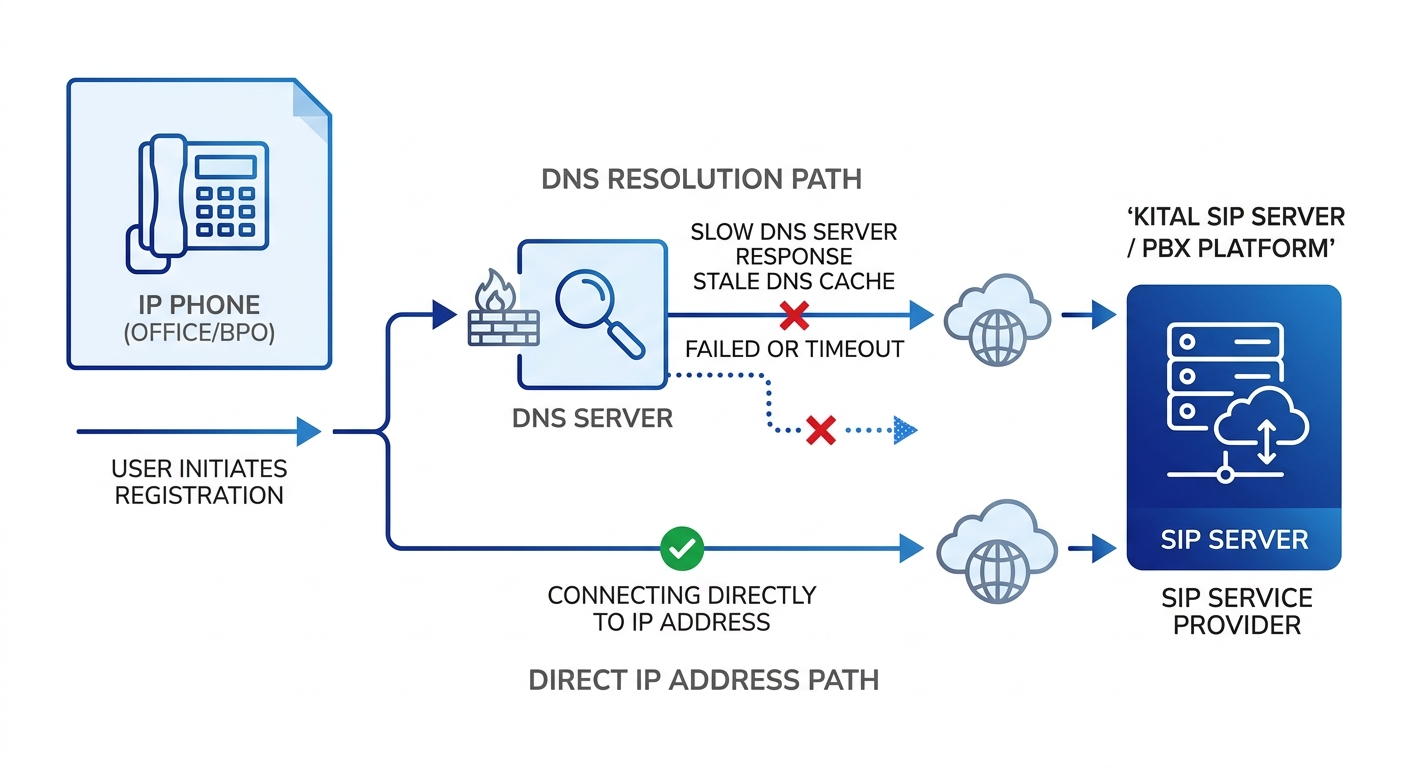
The permanent fix: deploy a local DNS resolver on your LAN. A caching DNS server on the same subnet as your phones reduces resolution time to sub-millisecond for repeated queries. For larger deployments, enterprises in Metro Manila running Yeastar or Asterisk-based PBXes sometimes configure dual DNS servers, one local cache and one external fallback, to ensure phones always get a fast response. If you’re already familiar with capturing traffic at both the PBX and firewall level for call flow analysis, the same technique reveals DNS timeout patterns when you filter for port 53 queries originating from the voice VLAN.
Tip: If your enterprise runs split-horizon DNS (common in organizations with both internal and external domains), verify that phones on the voice VLAN can resolve the SIP server’s FQDN correctly. A misconfigured split-horizon setup can silently return NXDOMAIN for the SIP domain, causing every phone on that VLAN to fail network device registration.
SIP ALG: The Feature That Breaks Everything It Touches
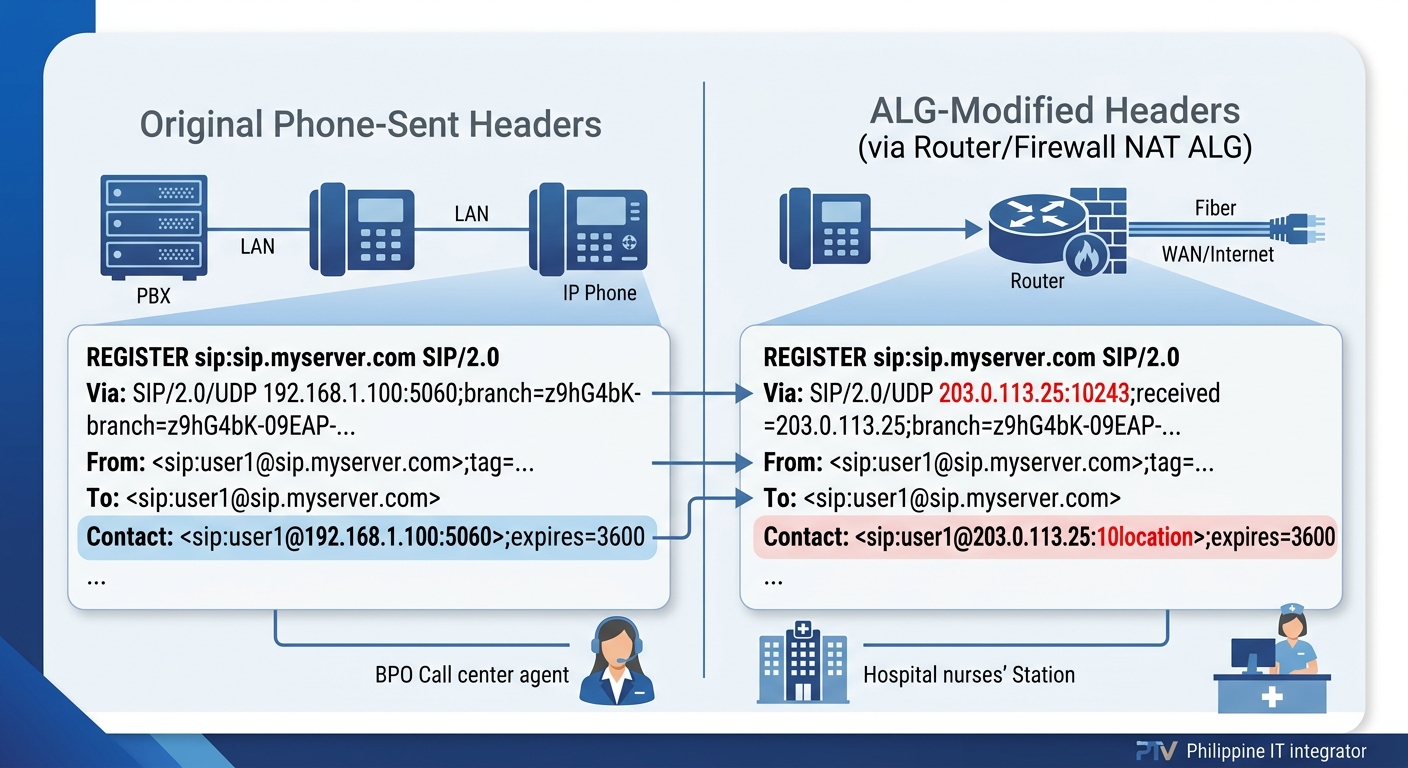
Application Layer Gateways for SIP were designed with good intentions. The idea was that routers and firewalls could inspect SIP packets, understand the protocol, and automatically adjust IP addresses and port numbers inside the SIP headers to handle NAT traversal. In practice, SIP ALG rewrites packets in ways that corrupt the registration process and introduce unpredictable behavior.
The symptoms are maddeningly inconsistent. A phone might register fine in the morning, drop offline at noon, re-register at 12:07, and work perfectly until the next day. Another phone on the same switch might never have issues. This inconsistency happens because SIP ALG modifies packets differently depending on timing, NAT state, and the specific router firmware version. Nextiva’s troubleshooting documentation identifies calls dropping after 10 minutes and device registration issues as common symptoms of SIP ALG interference, and recommends disabling the feature as a first step.
SIP ALG rewrites packets in ways that corrupt the registration process, and the symptoms are maddeningly inconsistent, which is exactly why it gets misdiagnosed as a PBX problem.
Disabling SIP ALG is the correct response. On Fortinet FortiGates, this means turning off the SIP application layer gateway in the CLI (the GUI sometimes doesn’t expose the setting clearly). On consumer-grade routers that some smaller Philippine businesses use as edge devices, look for “SIP Helper” or “SIP Passthrough” settings and disable them.
After disabling SIP ALG, enterprise phone system reliability depends on proper NAT handling through other means. Configure your PBX to use STUN (Session Traversal Utilities for NAT) or, better yet, deploy a Session Border Controller at the network edge. SBCs handle NAT traversal at the application level without the packet-mangling behavior of ALG.
When you’re reviewing network logs for VoIP troubleshooting, SIP ALG interference shows up as mismatched Contact headers in REGISTER messages. The phone sends a REGISTER with its private IP in the Contact field, the ALG rewrites it to the public IP but uses the wrong port, and the server’s 200 OK response goes to a port that nothing is listening on. Capturing traffic simultaneously on the PBX and at the firewall reveals the mismatch clearly.
Philippine Network Configurations Deserve Extra Scrutiny
Many Philippine enterprises, especially hospitals, hotels, and schools outside Metro Manila, still use ISP-provided CPE (customer premises equipment) as their primary router. These devices almost always have SIP ALG enabled by default, and the configuration interface may not even expose the toggle. If you’re running a Yeastar P-Series or S-Series PBX behind an ISP router in Davao or Iloilo and experiencing intermittent SIP registration failures, the ISP router’s ALG is the first thing to investigate.
In some cases, the cleanest solution is to bridge the ISP router (put it in bridge mode) and handle routing and firewall duties on a dedicated device where you have full configuration control. A FortiGate 40F or 60F handles this role well for offices up to 150 users and gives you complete visibility into how SIP traffic is being treated at the perimeter.
Where the Blame Actually Belongs
The thesis holds up under each piece of evidence. SIP registration failures are infrastructure problems. The phone is doing exactly what it’s configured to do: sending REGISTER messages at defined intervals. The PBX is doing exactly what it should: responding to valid registrations and timing out stale ones. The network layer between them is where bindings expire, packets get rewritten, and DNS queries time out.
This matters for how Philippine enterprises structure their support workflows. When VoIP deregistration events get escalated to the PBX vendor or the VoIP integrator, those teams spend hours examining server logs that show nothing abnormal. The server received a REGISTER, sent a 200 OK, and then heard nothing until the registration expired. The interesting data lives in the firewall logs, the NAT session table, and the DNS query logs.
If you’re building or maintaining an enterprise phone deployment, the diagnostic sequence should always start at the network perimeter. Check UDP session timeouts against SIP registration intervals. Verify DNS resolution speed from the voice VLAN. Confirm SIP ALG is disabled on every device between the phone and the PBX. And if your organization depends on voice communications for daily operations, think about how backup and recovery solutions apply to your PBX configuration files and firewall rulesets, because fixing these problems once means nothing if a firmware update or firewall replacement resets everything to defaults.
The phones aren’t broken. The PBX isn’t broken. Your network is making decisions about SIP traffic that nobody asked it to make, and it’s been doing that since the day the firewall was installed with factory defaults.